Contents
- New and Improved Functionality
- Fixes and Resolutions
- An error was being seen when trying to send Text Messages to contact details attached to jobs in the past.
- There is no option to resolve conflicts when using Daily Unavailabilities
- Showing 'All Personal Bookmarks' in configuration can cause performance issues
- Project Package Job Numbers and Task ID's are not mapped as expected for coreNotifications
- Historical Purge is not removing all jobs as required
- Attempting to view the Planning Board from the Project or Package view screens can display an error
- Archiving function can fail if all parameters are not set
- Diary Zoom/Shrink reverts after choosing some action options
- Shrink level of diary is not saved with Bookmarks
- If Diary Template is invalid when migrating from upgrade due to unconfigured options, it cannot be recovered.
- Diary shrink is not maintained if changing viewed time window
- Known Issues
- Internal Component Versions
- External Component Versions
DRS 6.1.17 - 20th December 2024

- New and Improved Functionality
- Fixes and Resolutions
- An error was being seen when trying to send Text Messages to contact details attached to jobs in the past.
- There is no option to resolve conflicts when using Daily Unavailabilities
- Showing 'All Personal Bookmarks' in configuration can cause performance issues
- Project Package Job Numbers and Task ID's are not mapped as expected for coreNotifications
- Historical Purge is not removing all jobs as required
- Attempting to view the Planning Board from the Project or Package view screens can display an error
- Archiving function can fail if all parameters are not set
- Diary Zoom/Shrink reverts after choosing some action options
- Shrink level of diary is not saved with Bookmarks
- If Diary Template is invalid when migrating from upgrade due to unconfigured options, it cannot be recovered.
- Diary shrink is not maintained if changing viewed time window
- Known Issues
- Internal Component Versions
- External Component Versions
Development of DRS Version 6.1.17 is now complete and was released in December, 2024. DRS 6.1.17 Contains a number of Performance updates, component upgrades and fixes to ensure the product remains stable and secure. It can be deployed as a patch to version 6.1.16.
New and Improved Functionality
Functional Improvement: Using Depots with Working Hours Calendars (DRS-8401)
What have we done?
It is now possible to select a specific DEPOT as a Start and/or End location for Working Hours calendars.
Why have we done this?
Historical versions of DRS allowed users to select specific Depots for the Start and End location to improve scheduling solutions for customers not using Worker Home Locations, or, where Workers have known different start and end locations on given days throughout the week.
How will you benefit?
Working Hours Calendars can now better reflect the Start and End locations for Workers who have different Start and End locations throughout the week. This will improve the quality of your Dynamic Resource Scheduling and the DRS Optimisation engine.
Details of the change
When configuring a Working Hours calendar, it is possible to select DEPOT as a Start and End location. If multiple DEPOTS are configured within DRS, there is no way to define which DEPOT the calendar is using. An addition has been made when the DEPOT option is selected, an additional dropdown will be enabled on the Working Hours Calendar configuration to select the appropriate DEPOT.
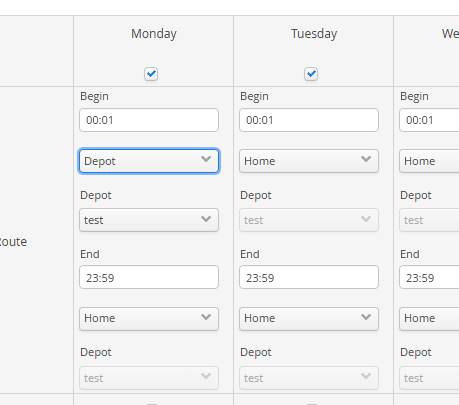
If there is only one DEPOT configured within DRS, this will be set as the default option on the Working Hours Calendar.
QOL Improvement: Improved Search and View data retrieval (DRS-7233 )
What have we done?
The speed that search views return data is improved in line with improvements made with other fixes in this release.
Why have we done this?
Customers were experiencing occasional issues with performance on returning data in views, where the data sets are significant in size. Performance issues could extend from slow view display, to no data being displayed on return.
How will you benefit?
Performance of displaying data will now be globally improved if housekeeping is appropriately configured.
Details of the change
Changes have been made to the way the archiving and purging services review data to be cleansed.
The purge and archiving functions have been improved to reduce the failure rates when large volumes of data are being cached for review.
This fixed is linked to other fixes within this release:
Historical Purge Not Removing All Jobs As Required
Archiving Function Can Fail If All Parameters Are Not Set
QOL Improvement: Performance Improvements within both UI and API layer (DRS-8360)
What have we done?
Product performance, both in the UI and API layer has been improved. Changes have been made inline with research and development gains made through the continued delivery of DRS 7.
Resource demand on major kernel requests, speed of display in diary requests and response on API requests have been significantly improved.
Why have we done this?
Performance and stability improvements are an important part of continuing to deliver a future looking and customer supportive product.
How will you benefit?
Diary load, Webservice Integration and Kernel response has been significantly improved. Major requests within the application should feel improved in general day to day usage.
Details of the change
The following significant changes have been made within the product:
- Efficiency changes around the session handling and caching. An improved caching mechanism has been added to handle sessions in the CS focussed on reducing the session handling requests by 10x.
- Changed the pooling and database test classes to use more efficient select requests.
- Fixed a number of connection leaks in the OTWSG and BG services.
- Fixed some connection leaks in the connector services.
- Changed logging management from debug to warn.
- Updated database instance caching to avoid unnecessary instances of hibernate sessions.
- Improved the Audit Purging to delete objects in batches of 500 instead of trying to delete all candidates at once.
- Connector Services requests will now be cleansed after they are finished being used.
- Diary Schedule Events now build base requests from the database directly instead of from the kernel.
- Memory from the GetDiaryScheduleEvents is now returned immediately to the pool instead of waiting for housekeeping
Resulting improvements have seen significant performance improvements against sandboxed Advanced instances and early release candidates deployed on Live Customer instances, reducing CPU and Memory usage on designated hardware by a significant portion.
Component Update: Tomcat, Apache and PHP version uplift (DRS-8436)
What have we done?
This release is aligned with the latest versions of available supporting infrastructure
Why have we done this?
Aligning DRS with latest infrastructure releases ensures DRS maintains a secure and stable posture.
How will you benefit?
Latest infrastructure patches contain security and performance improvements.
Details of the change
The following versions of product will be released with DRS 6.1.17:
- Apache 2.4.62
- Tomcat 9.0.98
- PHP 8.3.14
NOTE: A Manual Command is required to be run on upgrade to ensure this deploys. Please read the README file within the release for more information.
Fixes and Resolutions
Type | Issue | Description | Change Notes |
Issue | DRS-8416 | An error was being seen when trying to send Text Messages to contact details attached to jobs in the past. | The SMS Service was attempting to find contact details in the wrong location for Archived objects. This has been resolved. |
Issue | DRS-8470 | There is no option to resolve conflicts when using Daily Unavailabilities | When the Daily Unavailabilities function is used to add multiple Unavailabilities to multiple diary and it finds a scheduling conflict, the function will offer a global option to decide on how to manage all conflicts. |
Issue | DRS-8465 | Showing 'All Personal Bookmarks' in configuration can cause performance issues | There is a use case when using the Manage Bookmark function within the Configuration console that can cause DRS Performance issues. Customers with high volumes of Personal Bookmarks which are configured to show high volumes of workers can cause performance issues when viewed within the Manage Bookmarks view screen. This will now no longer cause an issue. |
Issue | DRS-8422 | Project Package Job Numbers and Task ID's are not mapped as expected for coreNotifications | The coreNotification service for a limited number of API configurations was not providing the expected value in the JOBNAME field on all outbound requests for Project Planner Jobs. To resolve this, a new parameter has been added to the Project Planner Configuration.  Setting this function to YES will set the JOBNAME value to match the value set as the PROJECTID. This function can be enabled for WebService gateway customers without risk due to the differences in the outbound mapping for Webservice Gateway requests. |
Issue | DRS-7850 | Historical Purge is not removing all jobs as required | A change has been made to the purge historical background service to resolve issues found when large volumes of data causes this service to fail when initially caching the tasks to purge. |
Issue | DRS-8419 | Attempting to view the Planning Board from the Project or Package view screens can display an error | The issue was caused by some invalid key data being passed in the requests to show Projects and Project Packages using the diary controller. This has now been resolved. |
Issue | DRS-7518 | Archiving function can fail if all parameters are not set | A change has been made to the archive historical service to ignore missing parameters if possible. |
Issue | DRS-7941 | Diary Zoom/Shrink reverts after choosing some action options | The Diary Shrink/Zoom function was resetting when moving away from the Diary screen, or other specific actions were taken. This has now been resolved and the Shrink/Zoom level will be retained |
Issue | DRS-8424 | Shrink level of diary is not saved with Bookmarks | The Diary Shrink/Zoom function was not saved when storing Bookmarks. The shrink/zoom level will now be retained when saving bookmarks. |
Issue | DRS-8442 | If Diary Template is invalid when migrating from upgrade due to unconfigured options, it cannot be recovered. | It was possible for Diary Template configurations to cause an issue on upgrade where the template could not be recovered when upgrading from DRS 5.7. The datacontroller managing this conversion and subsequent display has been updated to allow the template to be modified and recovered after the upgrade. Any template which becomes invalid now will display the following error for resolution by the Administrator. 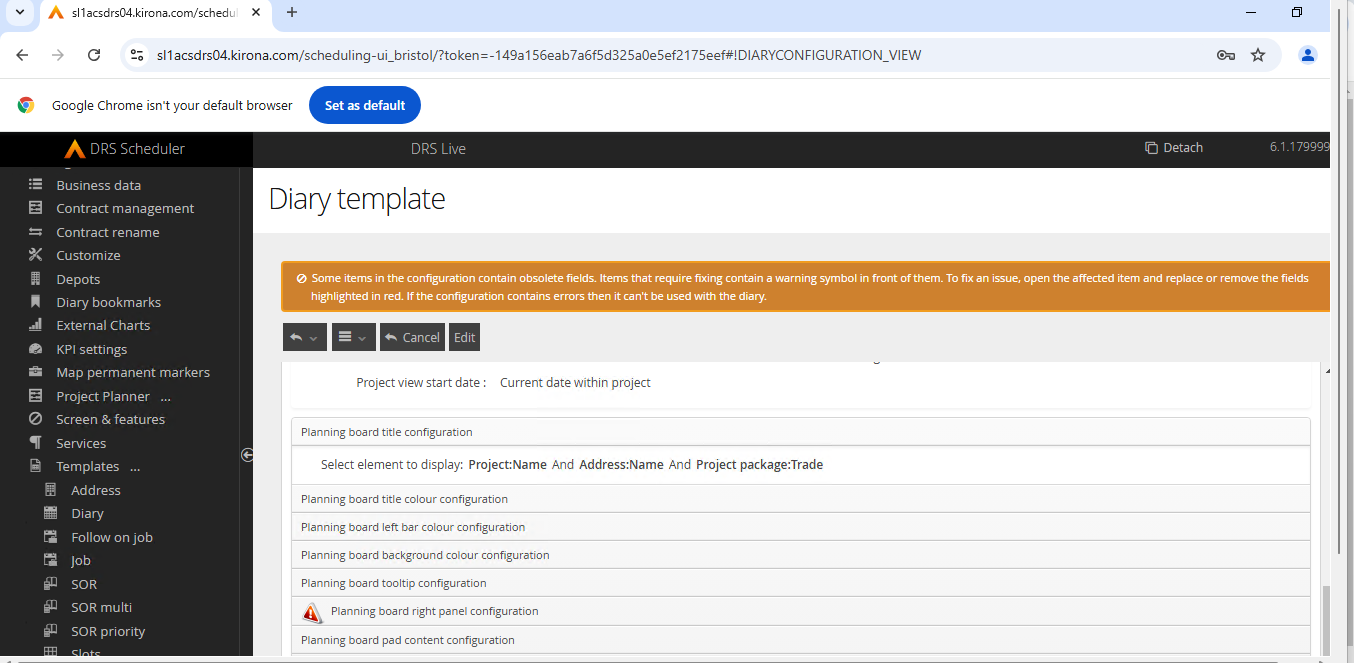 |
Issue | DRS-8446 | Diary shrink is not maintained if changing viewed time window | The Diary Shrink/Zoom function was resetting when moving away from the Diary screen, or other specific actions were taken. This has now been resolved and the Shrink/Zoom level will be retained |
Known Issues
Type | Issue ID | Description | Change Notes |
Internal Component Versions
Function | Version |
DRS Server (Kernel) | 6.3.1.9 |
Background Service | 6.1.17 |
Connector Services | 6.1.17 |
Inbound Connector | 6.1.17 |
Mobile Gateway | 6.1.17 |
Project Planner | 6.1.17 |
Utility Service | 6.1.17 |
DRS Web Services Gateway | 6.1.17 |
Archive/Housekeeping | 6.1.17 |
UK Geocoding Postcode Database | 07/2022 |
External Component Versions
Description | Version |
Apache | 2.4.62.0 (From 2.4.61.0) |
Java | 8.372.07.1 |
MariaDB | 10.6.17.0 |
MariaDB Java Client (JDBC) | 3.1.2 |
php | 8.3.14 (From 8.3.8) |
Tomcat | 9.0.98.0 |
Tomcat Native | 2.0.3.0 |
.Net | 4.7 |
SoapUI | 5.7.2 |