Contents
- New and Improved Functionality
- Fixes and Resolutions
- Adding in an unavailability to a diary with Project Planner Jobs scheduled displays an error and does not add the unavailability
- Unexpected Message appears when making project amendments
- The Delete un-started diary items option completes some diary items instead
- Time Lock on Manual Assignment is not working as expected
- 'Publish After Load' function is linked to Force Planning rather than Publish Permission
- Web Service Gateway is not correctly setting the service requirement flag from SOR template when creating jobs
- Project Package Completion Status is not shown on the Project Package screen
- Known Issues
- Internal Component Versions
- External Component Versions
DRS 6.1.20 - April 20th, 2025

- New and Improved Functionality
- Fixes and Resolutions
- Adding in an unavailability to a diary with Project Planner Jobs scheduled displays an error and does not add the unavailability
- Unexpected Message appears when making project amendments
- The Delete un-started diary items option completes some diary items instead
- Time Lock on Manual Assignment is not working as expected
- 'Publish After Load' function is linked to Force Planning rather than Publish Permission
- Web Service Gateway is not correctly setting the service requirement flag from SOR template when creating jobs
- Project Package Completion Status is not shown on the Project Package screen
- Known Issues
- Internal Component Versions
- External Component Versions
Development of DRS Version 6.1.20 is now complete and was released in April of 2025. DRS 6.1.20 Contains a number of QOL updates, component upgrades and fixes to ensure the product remains stable and secure. Due to an upgrade to the version of MariaDB, this version is a full install only and cannot be fast-patched from previous versions.
New and Improved Functionality
Feature Improvement: Allow for Multi Resource Template Jobs to have different appointment durations (DRS-8881)
What have we done?
Synchronous Job configuration has been added to DRS 6.1, developed in line with the use case, (where possible), with previous 5.7 functionality.
Why have we done this?
This functionality was previously de-prioritised due to lack of use. Recent interest has been shown by Customer Engagement sessions to have this functionality re-implemented to improve user experience and overall scheduling quality.
How will you benefit?
Tasks can now be set to Synchronous, or De-Synchronous, to allow for Paired Jobs to be scheduled with different durations. Start time of Jobs will remain the same at the point of schedule and optimisation.
Details of the change
This functionality is enabled by setting the following Parameter to active.
Configuration>Screens and Features>Discountinous job
When the feature is enabled the ability to set both individual Jobs and Job Templates as synchronous or non-synchronous is available.
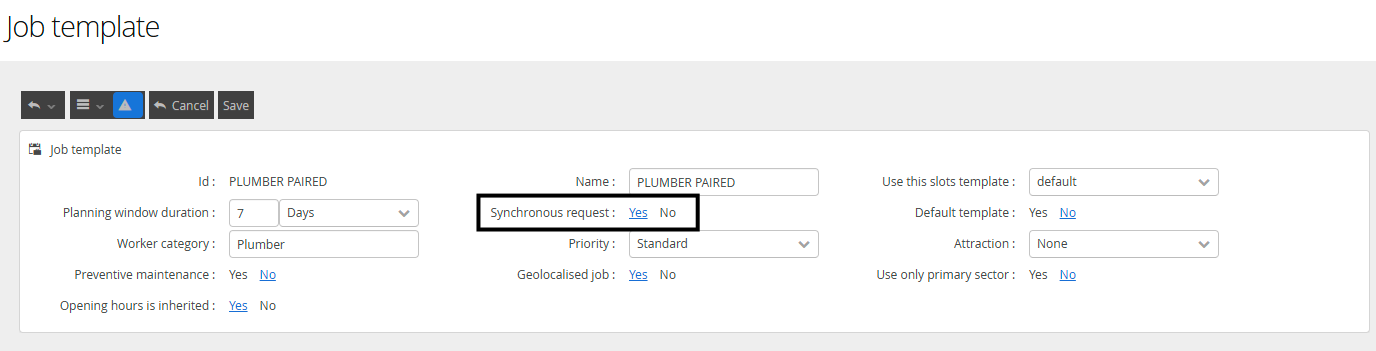
This feature is only available on Paired Jobs, where users will also have this option on each resource request, apart from the first one, to set this feature. This can be set on the JOB EDIT screen.

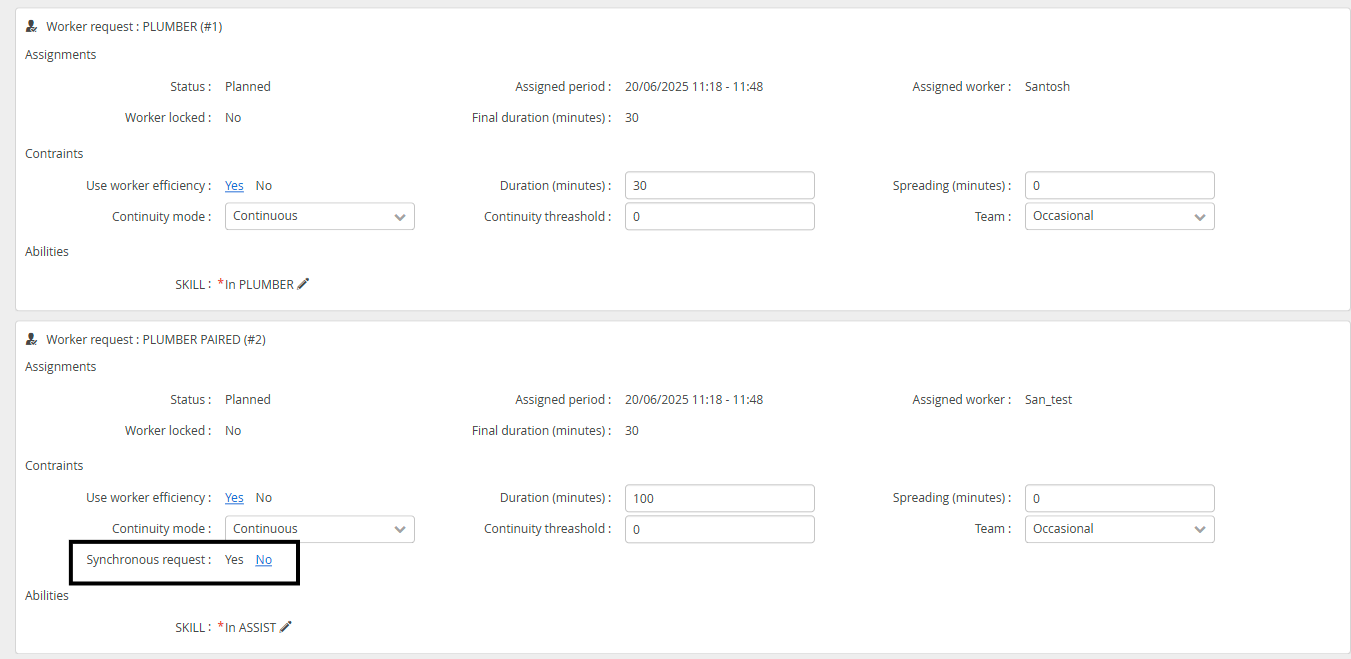
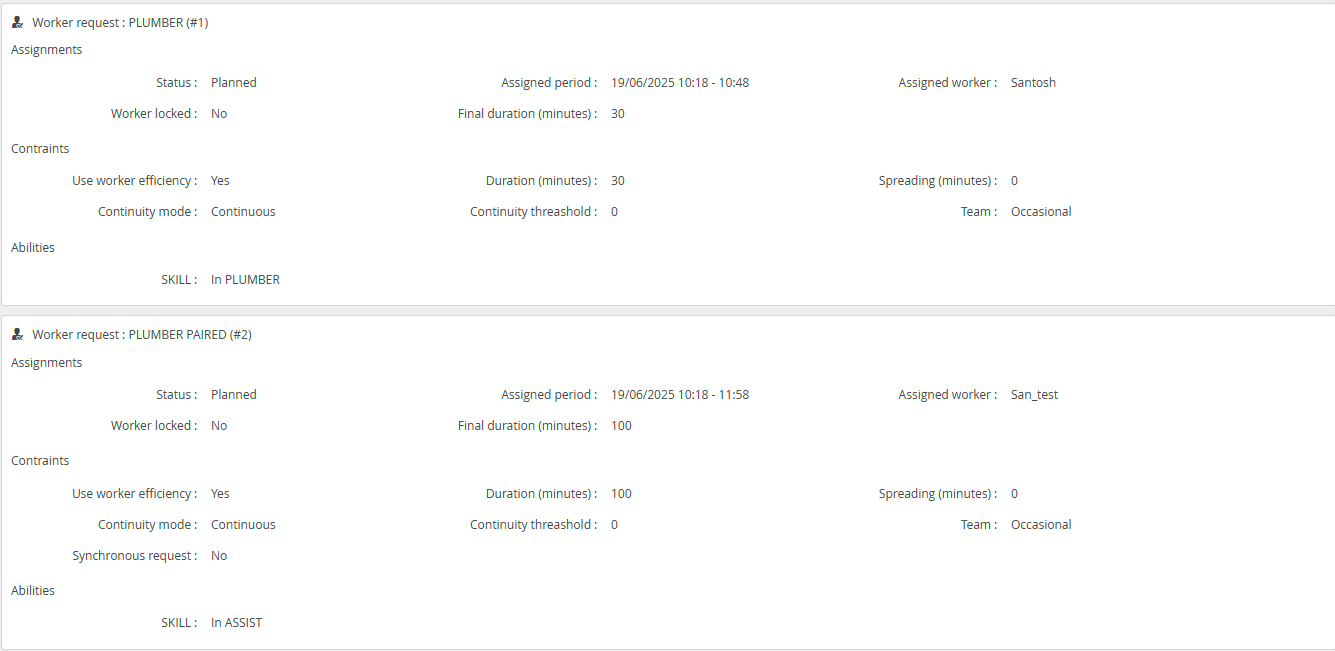
Non Synchronous Jobs can have different durations and assignment periods. These values are updated on each successful schedule, or, after each Mobile update.
This will reflect in the display on the diaries too.
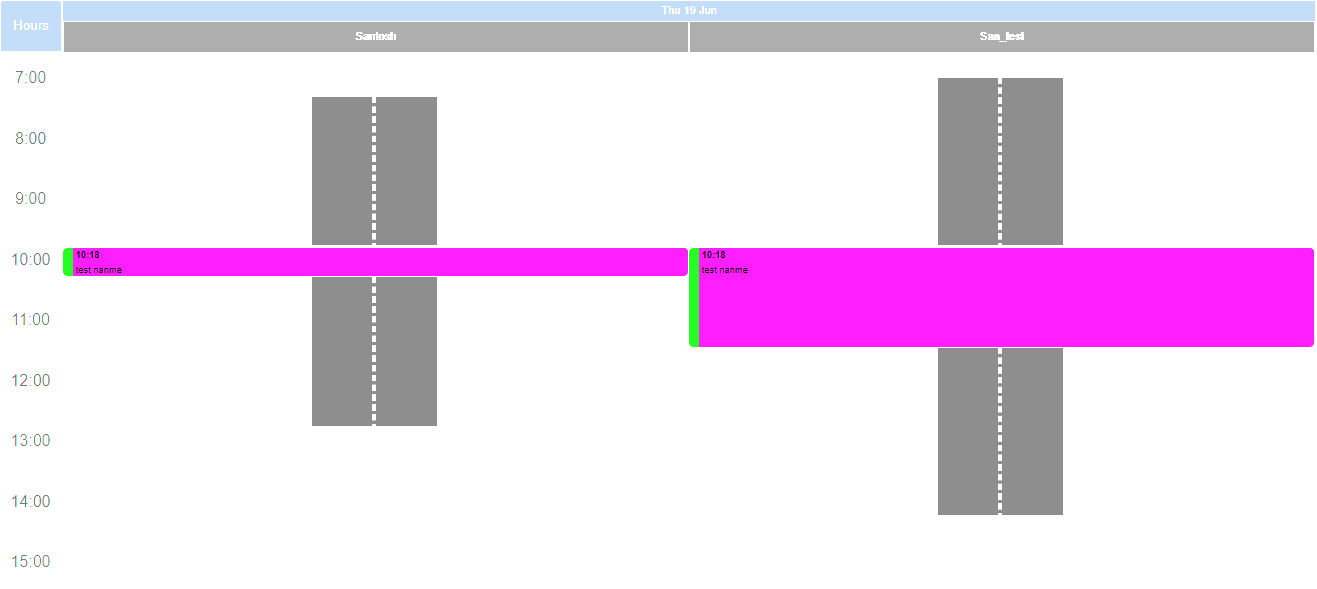
If a paired job is not synchronous it will use the duration of each scheduled item when setting the assignment period, this will now set the end as assigned start + duration, and will take into account efficiency if use workers efficiency is selected. All available tasks will use the same Assignment Start time, but may have different Assignment End times, duration pending.
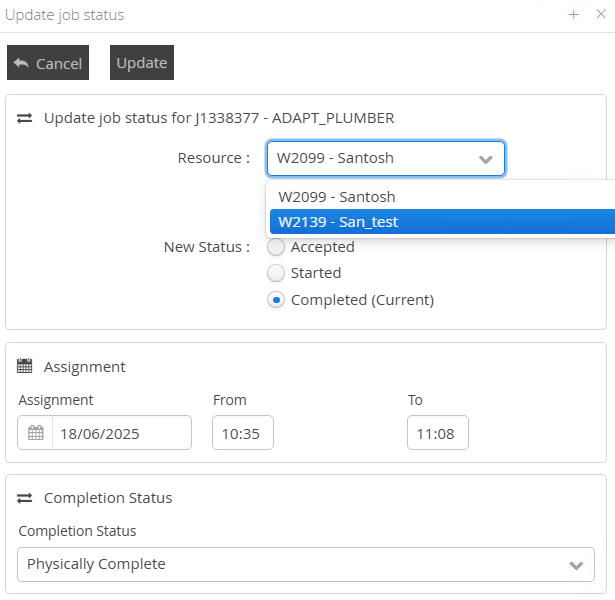
When updating Paired Jobs manually, care should be taken to select the correct Resource from the Update Job Status modal to ensure the appropriate update has been applied.
Component Update: PHP Vulnerabilities Identified (DRS-8818)
What have we done?
The version of PHP deployed with DRS has been updated to the latest available release (8.3.20)
Why have we done this?
Maintaining appropriate security posture ensures your application and data is protected and secure from known vulnerabilities.
How will you benefit?
Maintaining appropriate security posture ensures your application and data is protected and secure from known vulnerabilities.
Details of the change
PHP has been updated to version 8.3.20. This will be deployed by default with all 6.1.20 releases, and is also available for patching on releases 6.1.8 -> 6.1.19
Component Update: Tomcat 9.0.104 (DRS-8818)
What have we done?
The version of Tomcat deployed with DRS has been updated to the latest available release (9.0.104)
Why have we done this?
Maintaining appropriate security posture ensures your application and data is protected and secure from known vulnerabilities.
How will you benefit?
Maintaining appropriate security posture ensures your application and data is protected and secure from known vulnerabilities.
Details of the change
Tomcat has been updated to version 9.0.104. This will be deployed by default with all 6.1.20 releases, and is also available for patching on releases 6.1.8 -> 6.1.19
Component Update: MariaDB Version Upgrade (DRS-8652)
What have we done?
The version of MariaDB deployed with DRS has been updated to the latest available release (10.6.22)
Why have we done this?
Maintaining appropriate security posture ensures your application and data is protected and secure from known vulnerabilities.
How will you benefit?
Maintaining appropriate security posture ensures your application and data is protected and secure from known vulnerabilities.
Details of the change
MariaDB is only available at the latest release and all customers requiring this patch will be required to deploy 6.1.20.
Fixes and Resolutions
Issue Type | Issue key | Summary | Description |
Issue | DRS-8890 | Adding in an unavailability to a diary with Project Planner Jobs scheduled displays an error and does not add the unavailability | A check was failing when DRS was attempting to display the Modal to the user warning of Jobs and Diary Items were effected by the addition of an Unavailability. This check has now been resolved, and when attempting to add an Unavailability where a Project Planner visit is effected, DRS will now display the Modal requesting the user to make the appropriate scheduling choices. |
Issue | DRS-8829 | Unexpected Message appears when making project amendments | An error was being caused when Order Amendments were provided to DRS where the SOR was not configured within Project Planner. A change has been made so that any Order Amendment provided to Project Planner where the SOR does not exist in the configuration will process correctly. Any SOR's which have not been configured will not be processed and will be noted on the Issues List for the Project. |
Issue | DRS-8856 | The Delete un-started diary items option completes some diary items instead | An issue was found when users updated the Status of Project Packages to 'Complete' and selected the 'Delete Un-Started Diary Items' option, Project Planner was setting Published Diary Items to Complete, rather than deleting them. The logic for this function has been updated so that for the package that is being set to Completed, a check will be made for Started, but not Completed Diary Items. If any are found, a message will be displayed to alert the user that all started diary items will be set to Completed. If the user selects cancel, the update will not completed and a message will display to ask the User to review and complete all Started diary items first. If there are no started diary items or the user selects OK to the message, the update will continue. If there are loaded or published diary items and the option to delete un started diary items is selected, these will be deleted first. Following this, the package status and any remaining diary items will be set to completed. If the option to delete un started diary items isn’t selected, then the package status and any remaining diary items will be set to completed. |
Issue | DRS-8409 | Time Lock on Manual Assignment is not working as expected | An issue was found where if a user set the TIME LOCK option on the Manual Assignment screen, the Job would lock, but the Assignment Change would not be updated to the new time. This has now been updated to ensure that the TIME LOCK function works as expected.This is happening on any visit in LIVE and also happens in Test/Train and To Be Live environments but was missed during testing. |
Issue | DRS-8820 | 'Publish After Load' function is linked to Force Planning rather than Publish Permission | A change has been made to ensure the display of the Publish After Load option when using the FORCE ASSIGNMENT option is linked to users having the PUBLISH permission allocated on the User Profile. |
Issue | DRS-8855 | Web Service Gateway is not correctly setting the service requirement flag from SOR template when creating jobs | An issue was caused by a change to the logic for Job Creation within the Webservice Gateway to support 3rd party integration. This has caused the SERVICE REQUIREMENT flag to be set incorrectly on Job Creation. This has been resolved. |
Issue | DRS-8848 | Project Package Completion Status is not shown on the Project Package screen | It was found that in some instances when using the Update Status option on the Project Package screen, the correct Completion Status was not being attributed to the Project Package or remaining diary items. This was attributed to Business Data not being correctly parsed from the configuration. This is now resolved and Completion Status' will be correctly applied to Diary and Project Package screens when manually updated from the Project Package or Diary Item. |
Known Issues
Internal Component Versions
Function | Version |
DRS Server (Kernel) | 6.3.1.9 |
Background Service | 6.1.20 |
Connector Services | 6.1.20 |
Inbound Connector | 6.1.20 |
Mobile Gateway | 6.1.20 |
Project Planner | 6.1.20 |
Utility Service | 6.1.20 |
DRS Web Services Gateway | 6.1.20 |
Archive/Housekeeping | 6.1.20 |
UK Geocoding Postcode Database | 07/2022 |
External Component Versions
Description | Version |
Apache | 2.4.63 |
Java | 8.442.06.1 |
MariaDB | 10.6.22 |
MariaDB Java Client (JDBC) | 3.1.2 |
php | 8.3.20 |
Tomcat | 9.0.104 |
Tomcat Native | 2.0.3.0 |
.Net | 4.7 |
SoapUI | 5.7.2 |