Contents
- Notable Issue Resolutions
- Other Fixes and Resolutions
- Unable to Replace Project Package Error displayed when creating a follow on
- Business Data Audit field resets after full product restart
- Has Follow On Flag does not filter correctly within views
- Appointment Assignment for Templates with Multiple Skills is not properly respected
- View Name not showing correctly in dropdown list
- Operative Comments are not flowing through to Project Planner from Mobile
- A disabled Admin Account will terminate an upgrade attempt
- Profile Restrict by Template is not respected fully
- Project Planner Diary items are assigned to a worker on their non-working day
- The Delete un-started diary items option completes the diary items instead
- Known Issues
- Internal Component Versions
- External Component Versions
DRS 6.1.18 - 13 February 2025

- Notable Issue Resolutions
- Other Fixes and Resolutions
- Unable to Replace Project Package Error displayed when creating a follow on
- Business Data Audit field resets after full product restart
- Has Follow On Flag does not filter correctly within views
- Appointment Assignment for Templates with Multiple Skills is not properly respected
- View Name not showing correctly in dropdown list
- Operative Comments are not flowing through to Project Planner from Mobile
- A disabled Admin Account will terminate an upgrade attempt
- Profile Restrict by Template is not respected fully
- Project Planner Diary items are assigned to a worker on their non-working day
- The Delete un-started diary items option completes the diary items instead
- Known Issues
- Internal Component Versions
- External Component Versions
Development of DRS Version 6.1.18 is now complete and was released in February, 2025. DRS 6.1.18 Contains a number of updates and fixes to ensure the product remains stable and secure. It can be deployed as a patch to version 6.1.17.
Notable Issue Resolutions
Changing a value on a Worker Template Attribute changes the value in all Worker Templates (DRS-8461)
What have we done?
A major change to the way we manage Worker Template Attributes in DRS 6. This will effect the recorded ATTRIBUTE ID for all new Attributes created on a Worker Template.
Why have we done this?
DRS allowed for Worker Template Attributes to use the same ID and NAME values for consistency, which resulted in the same values being shared across all Worker Template Attributes of the same ID. When attempting to use different lists of values using Attributes which shared the same ID value, all listed values would be updated across all Attribute lists on all Templates. This was resulting in unexpected selection options in varying Worker Templates.
How will you benefit?
DRS will now automatically apply an increment value to all Attribute ID's where the value already exists. This change will not resolve any existing issues where attribute ID's are shared across existing Templates.
Details of the change
When creating new Worker Template Attributes, DRS will now do a check to determine if that Template Attribute already exists. If it does, DRS will automatically apply an incremented value to the end of the Attribute ID.
Example: An attribute has been created with an ID of "SKILL". DRS will check if an Attribute with an ID of "SKILL" exists, if it does, DRS will change this value to "SKILL_1". The NAME field for this Attribute will remain unchanged.
Component Update: Upgrade the version of 7Zip released with the application (DRS-8501)
What have we done?
We have released a new version of 7Zip deployed within the APPS folder in the DRS installation.
Why have we done this?
The deployed version was reported as compromised.
How will you benefit?
All bundled applications within the APPS folder will be deployed with stable reported versions.
Details of the change
The latest version of 7Zip will be deployed with all new deployments of DRS.
Component Update: Java Version Upgrade (DRS-8488)
What have we done?
This release is aligned with the latest versions of available supporting infrastructure
Why have we done this?
Aligning DRS with latest infrastructure releases ensures DRS maintains a secure and stable posture.
How will you benefit?
Latest infrastructure patches contain security and performance improvements.
Details of the change
The following versions of product will be released with DRS 6.1.18:
Java - 8.442.06.1
Other Fixes and Resolutions
Type | Issue ID | Description | Change Notes |
Issue | DRS-8352 | Unable to Replace Project Package Error displayed when creating a follow on | When attempting to create a follow on for a Package within Project Planner, an issue was found that would result in the system displaying the error message 'Unable to replace Project Package'. The issue happens because of some flawed logic which tries to find the highest value of the Sorcode item number when special characters are used within the ProjectID and or Project Name. This has now been resolved and the SOR selection will no longer fail this request. |
Issue | DRS-8460 | Business Data Audit field resets after full product restart | When setting a piece of Business Data to 'Audit', a full product reset would clear this flag and set the default value as the 'Audit' field for the History tab.
When upgrading a customer it will be necessary to amend the file \\DRS\CONF\custom.properties and \\DRS\TOMCAT\SERVICES\TOMCATxCSxXXXX\webapps\opt-ffa-connector-services_optitimeweb\conf\user.properties and remove references to (if configured): com.kirona.drs.audit.jobBDToStore=APPOINTMENT_REASON |
Issue | DRS-8471 | Has Follow On Flag does not filter correctly within views | When adding the 'Has Follow On' flag to views and attempting to use this to Filter, the selected Filter options are not respected and will always show all tasks which have a follow on. |
Issue | DRS-7971 | Appointment Assignment for Templates with Multiple Skills is not properly respected | If a Job Template has multiple values assigned to an Attribute, DRS is not respecting all values when attempting to find available operatives for scheduling, and instead, will select any operative with either value configured. |
Issue | DRS-8371 | View Name not showing correctly in dropdown list | When loading a screen with a selectable View, there are instances where these names will not be displayed correctly and will use the system value name for the configured View. The issue occurs because the data source was being applied to the combo box before an ItemCaptionGenerator has been set. |
Issue | DRS-8438 | Operative Comments are not flowing through to Project Planner from Mobile | When jobs are completed in Mobile, Operative Comments are passing through to the DRS Job correctly, but are not being mapped to the Project Planner Diary Item as part of the object updates. A mapping issue was found with Project Planner updates. |
Deployment | DRS-8491 | A disabled Admin Account will terminate an upgrade attempt | If a customer disables the default ADMIN user account within their environment, any attempt to complete an upgrade will miss several key component updates. |
Issue | DRS-8441 | Profile Restrict by Template is not respected fully | When using the 'Restrict Job Template' option within the user profile, it is not masking all configured Job Templates and I am able to select from a variety of Templates which should be hidden from me. Within Views, details of Templates are provided which should be restricted to me. 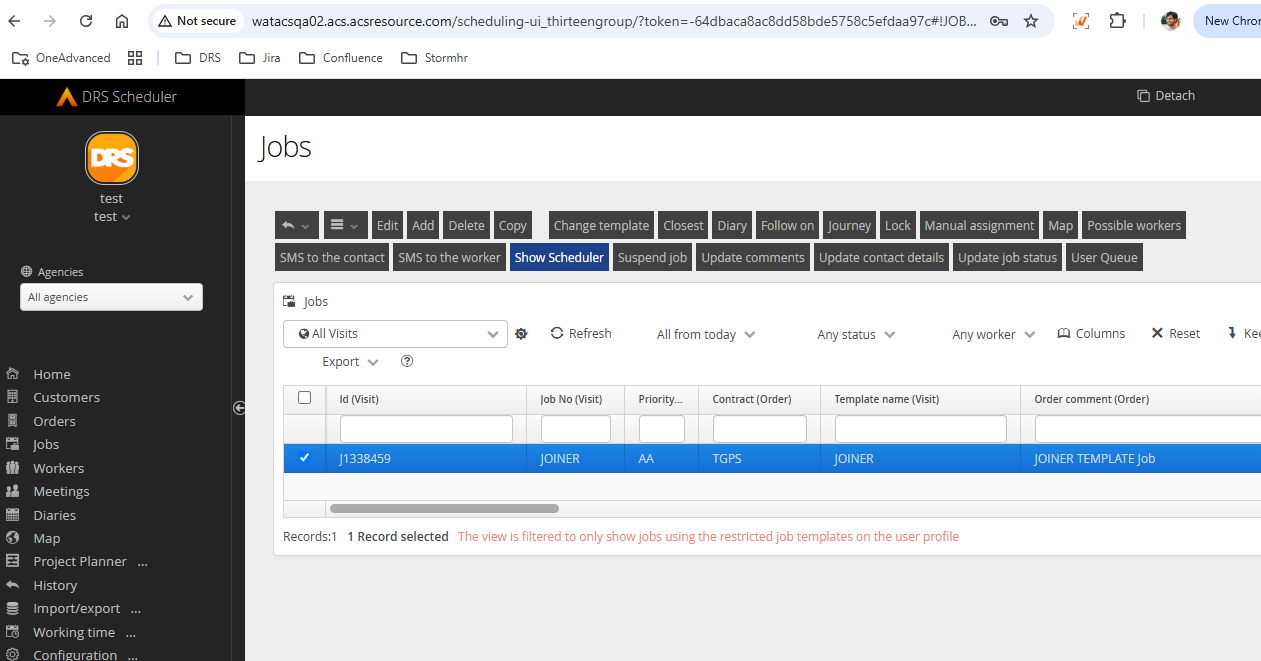 |
Issue | DRS-8454 | Project Planner Diary items are assigned to a worker on their non-working day | Project Planner Diary Items are being scheduled to Operatives on Non-Working days for some configured Rotas. This issue was caused by the calculation to work out what day in the rota it needed to start from when calculating availability was incorrect. The calculation was always one day behind where it should be, so if the package period started on the 20/01, which relates to day 10 in the rosta calendar, and day 10 is a day off, the calculation would start it at day 9. If day 9 was a normal working day then it would schedule the package thinking there was space on that date, instead of moving on as it was actually unavailable. |
Issue | DRS-8469 | The Delete un-started diary items option completes the diary items instead | Using the 'Delete Unstarted Diary Items' option on the Status Update function for the Project Package, some instances of Diary Items are not being deleted. The problem occurred when an Sor code with a high quantity (eg. quantity 10, SMV 120) was split over multiple diary items. The planned diary items were deleted but another update then changed the status of those items to completed which reinstated the items. |
Known Issues
Internal Component Versions
Function | Version |
DRS Server (Kernel) | 6.3.1.9 |
Background Service | 6.1.18 |
Connector Services | 6.1.18 |
Inbound Connector | 6.1.18 |
Mobile Gateway | 6.1.18 |
Project Planner | 6.1.18 |
Utility Service | 6.1.18 |
DRS Web Services Gateway | 6.1.18 |
Archive/Housekeeping | 6.1.18 |
UK Geocoding Postcode Database | 07/2022 |
External Component Versions
Description | Version |
Apache | 2.4.62.0 |
Java | 8.442.06.1 (From 8.372.07.1) |
MariaDB | 10.6.17.0 |
MariaDB Java Client (JDBC) | 3.1.2 |
php | 8.3.14 |
Tomcat | 9.0.98.0 |
Tomcat Native | 2.0.3.0 |
.Net | 4.7 |
SoapUI | 5.7.2 |