Contents
- Introduction
- Overview
- Pre-requisites
- Capturing Customer Contact Details
- Appointment Confirmation
- Different Appointment Confirmation instances
- Validation Checks for Active Messaging
- Appointment Reminders
- Operative On-Route
- Customer No Access
- Contract Exclusions / Specific Messaging
- Priority Exclusions
- Appendix - Decisions Required by Customer Prior to Implementation
- Decisions Required
Configuring Text Messaging

- Introduction
- Overview
- Pre-requisites
- Capturing Customer Contact Details
- Appointment Confirmation
- Different Appointment Confirmation instances
- Validation Checks for Active Messaging
- Appointment Reminders
- Operative On-Route
- Customer No Access
- Contract Exclusions / Specific Messaging
- Priority Exclusions
- Appendix - Decisions Required by Customer Prior to Implementation
- Decisions Required
Introduction
Customer Messaging involves sending SMS text messages to tenants to keep them informed about when appointments have been arranged, re-arranged and when the operatives are on way to their properties.
Detailed throughout this document are the differences between Active Messaging (customers using their own SMS provider) and the Core SMS functions that are only available to customers who have purchased SMS bundles from Advanced directly.
Overview
Customer Messaging generally consists of the following message types:
- Appointment Confirmations
- Appointment Reminders
- Operative On-Route
- Survey
DRS can be configured to send (or not send) each message type separately and configuration rules can be used to determine if it should be excluded for certain priorities or contracts.
If you are an Advanced SMS Customer and using the Core SMS functionality, we can work with you on extending this even further and more flexible exclusions can be put in place on any object attribute used on your jobs. There is also the option to extend the type of messaging being put in place such as No Access specific messaging.
DRS also has the capability for the call centre to check and confirm whether the telephone number provided is correct and able to receive SMS messages. They are also able to override any rules in place and switch off the messaging for that order.
Message Type | Description |
Appointment Confirmations | Assuming a message is to be sent – DRS will send the Appointment Confirmation once the appointment has been scheduled or re-scheduled. For Example: “Advanced Repairs will be calling on the 30th October between 13:00 and 16:00. If this is not convenient, please call on 01234567890 to re-arrange the appointment” |
Appointment Reminders | Within Active Messaging there is configuration within the database to send 2 instances of a reminder text message “N” days before the appointment. This is configured to run at a set time of day. If using Core SMS – This is extremely flexible and can be configured to your specifications and run at different times of day for different types of work. |
Operative On-Route | Once the job status has been set to Accepted on the mobile device this can be configured to send a further SMS to the customer to advise that their operative is on way to their property. Furthermore, if you are an Operative on Way customer, to improve customer satisfaction this can trigger out a text with a link to a real time map of where the operative currently is and estimated ETA. |
Customer Survey | On completion of the visit, DRS can send a customer satisfaction text message. This currently needs to link to an external survey source. |
Pre-requisites
Active Messaging – Customers using their own SMS provider
- Consultancy from Advanced on Customer Messaging configuration and training on how to manage it going forward.
- Solution in place by customer on how to obtain the XML messages generated by DRS
- Solution in place by customer on how these XML files are converted to be used by their SMS provider
Core SMS – Requires an Advanced SMS Package
- Consultancy from Advanced on Customer Messaging configuration and training on how to manage it going forward.
- Customer to provide DRS server access to communicate with the Advanced SMS API Gateway.
Capturing Customer Contact Details
Customer contact details can be captured in the call centre system or entered directly in DRS.
When a new Order and its Job(s) are created in DRS, the messaging parameter within the file or webservice request is used to define whether messaging is required for the Order and the MESSAGE field held on the order is set to YES or NO accordingly. If no value has been supplied in the interface, the MESSAGE field is set to NOT SET (unless a default is configured).
When new jobs are scheduled, the user will be given the option to amend the contact details and if messaging is required as per the below screenshot..

Once a job has been scheduled but there is still a requirement to change the contact details or preferences – this can be done by clicking the “Update Contact Details” button from within the job.

Appointment Confirmation
A text message is produced once a job has been scheduled into a timeslot or re-scheduled into a different timeslot. This is normally then sent immediately to the customer. With Core SMS you also have the functionality of setting time windows of when these SMS are sent out to not send in unsocial hours.
Format of Appointment Confirmation – Active Messaging
The format of the Standard Appointment Confirmation is as follows:
<BEFORE TEXT> <Window start & end time> <AFTER TEXT>
Example:
“Advanced Repairs will be calling on the 30th October between 13:00 and 16:00. If this is not convenient, please call on 01234567890 to re-arrange the appointment”
The exact text can be specified in the DRS UI > Configuration > Text Messaging Parameters Screen. Separate text is available for the initial appointment, a re-arranged appointment and follow-on appointments.
Placeholders may be used within either Before or After Text. These placeholders take the form of the characters <ORD>, <RES>, and <RESCAT>. When the text messages are produced, the placeholders are substituted in the text by the task order number, the resource name and the trade category defined within the job template under Worker Category.

Format of Appointment Confirmation – Core SMS
The standard configuration as per the Active Messaging section shown previously can be used or this can be configured using the new Text Message templates as per below.
This can be as flexible as you wish and are configured within the following area:
DRS UI > Configuration > Templates > Text Message
In addition to this the availability of placeholders has increased and you are able to use the following keywords:
<CONTACTNAME> : contact name. order's one if possible, if not customer's one
<ADDRESS> : address of the job, order or customer (depends on context)
<SLOT> : job's slot
<RES> : resources name
<ORD> : primary order number
<RESCAT> : trade
<BD:CUS.OBJECT> : where OBJECT can be any business data from the customer
<BD:SO.OBJECT> : where OBJECT can be any business data from the order
<BD:JOB.OBJECT> : where OBJECT can be any business data from the job
<BD:WOR.OBJECT> : where OBJECT can be any business data from the worker
For these to be used however these must be used in partnership with the Scheduled Services function of which your consultant will work through with you depending on your requirements.

Different Appointment Confirmation instances
The following different instances may occur:
Area | Description | Solution |
Initial appointment | First appointment with the tenant for this order | Standard appointment confirmation text |
Re-arranged appointment | If an appointment is moved, then a message is sent saying that the appointment has been re-arranged | Re-arranged appointment confirmation text |
Follow on appointments | If a follow-on task is created then a separate appointment confirmations is sent | For each follow on a separate appointment confirmation can be sent using the appointment confirmation follow on text. |
Validation Checks for Active Messaging
The following validation checks take place for Appointment Confirmations.
- A check is made that Active Messaging is required for Appointment Confirmations.
- A check will be made that the Priority has not been excluded from Active Messaging.
- A check will made to see if Active Messaging is required for this job i.e., job flagged as “Message: Yes”
- A check will be made that the contract has not been excluded for appointment confirmations.
- A check will be made whether this is an appointed or floating job (planning window = same day or not). If floating job check that appointment confirmations are required for floating jobs.
If all tests are OK then an XML file is created in the Active Messaging Out Box (or in the instance of using Core Messaging it will create a direct request to the Advanced SMS API).
Appointment Reminders
As per configuration set by your consultants’ reminders can be sent the day before the appointment, or first thing the morning of the scheduled day for example depending on requirements. With Active Messaging there is only the possibility of sending a maximum of 2 reminders, however again with Core SMS the functionality is flexible.
These reminders will follow the same format of configuration as per the Appointment Confirmations however you can amend the format of the reminder to have a different text to what is sent as per the confirmation.
Operative On-Route
This text message is produced whenever a job is updated to “Accepted” by the operative.
Care must be taken that the operative is setting this status at the correct time otherwise if set to message the customer will get a text that they are on way.
Customer No Access
No Access messaging is not possible using Active Messaging however this can be configured in Core SMS in partnership with your consultant to look at No Access jobs and generate a text message based on that.
Contract Exclusions / Specific Messaging
Active Messaging
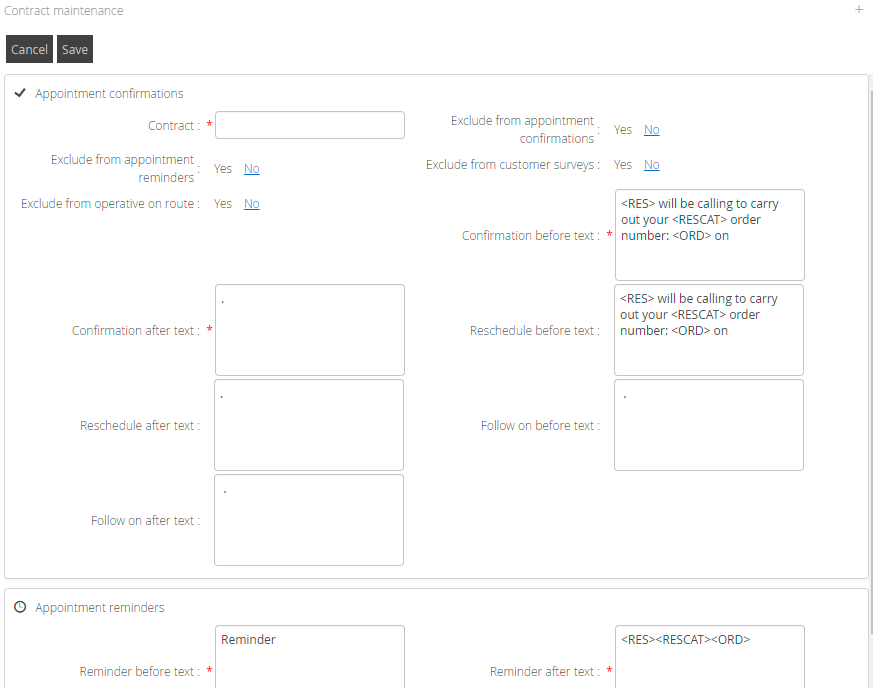
DRS UI > Configuration > Text Messaging Parameters > Contract Maintenance
From here you can either exclude certain contracts from sending out text messaging or you are able to send a different formatted text to the customer.
Core SMS
The above contract exclusions can be used or if there are further specific exclusions that you wanted then these can be configured as part of your set up with your consultant into how you build the flexible views that the Scheduled Service runs against.
Priority Exclusions
Active Messaging
DRS UI > Configuration > Text Messaging Parameters > Priority Exclusion
From here you can select the priority you are referring to and the message type you wish to exclude from that priority.
Note: If a priority is to be excluded from several message types, an entry will be required for each message type / priority combination.

Core SMS
The above priority exclusions can be used or if there are further specific exclusions that you wanted then these can be configured as part of your set up with your consultant into how you build the flexible views that the Scheduled Service runs against.
Appendix - Decisions Required by Customer Prior to Implementation
Overview
This section is designed to highlight the initial decisions that management need to make before the customer messaging facility is implemented. This section has been written to be self-standing so it can just be e-mailed to a customer without the need to read this entire document.
Customer Messaging consists of the following message types (or if you have purchased an SMS package from Advanced, please discuss with your consultant the other potential messages you can put in place.)
Message Type | Description |
Appointment Confirmations | DRS can send the Appointment Confirmation immediately on scheduling an appointment and whenever an appointment is re-arranged |
Appointment Reminders | The day before the appointment or the day of the appointment DRS can automatically send an Appointment Reminder for all qualifying visits. |
Operative On-Route
| The Operative on-route message can be sent whenever a job is “accepted” to inform the tenant that the operative is about to arrive. |
Customer Survey | On completion of the visit, DRS can send a customer satisfaction text message. This currently needs to link to an external survey source. |
Note: Messages can only be 160 characters long
Decisions Required
General Principles
Do you want to capture the contact details in your core system or in DRS? Contact details can be captured in your core system or directly in DRS. If you want to capture the details in your core system and then the interface the details to DRS you must include this data over the interface. Advanced recommends using DRS if the interface does not already support this. | Core system or DRS |
What instructions are you going to give to the call centre about customer messaging? You need to be clear about the instructions to be given to the call centre staff. For example, Whether you want to individually inform the tenant that they will receive a text message confirming the appointment | |
What display name will you use for SMS messages (limited to 11 characters)? e.g. XYZ Council or Repairs etc. appears on the customers mobile phone as the from address |
Appointment Confirmations
Do you want Appointment Confirmation messages? | YES or NO |
What text do you want for Appointment Confirmation Messages? Example XYZ Housing Repairs will be calling on June 12th between 08:00 and 12:00. If this is not convenient, please call 0800 99999. Example using text placeholders XYZ Housing Repairs <RESCAT> will call on June 12th between 08:00 and 12:00. If this is not convenient, please call 0800 99999 quoting job <ORD> | |
What text do you want for Appointment Confirmation for re-arranging appointments? Example XYZ Housing Repairs have re-arranged your appointment for June 12th between 08:00 and 12:00. If this is not convenient, please call 0800 99999. | |
Do you want appointment confirmations for follow on work? | YES or NO |
What text do you want for follow on Appointment Confirmation messages? Example XYZ Housing Repairs will be calling again on June 12th between 08:00 and 12:00. If this is not convenient, please call 0800 99999. | |
Are there any priorities that you always want to be excluded from messaging? | Please list |
Appointment Reminders
Do you want Appointment Reminder messages? | YES or NO |
What text do you want for Appointment Reminder Messages? Example XYZ Housing Repairs reminds you that you have an appointment for tomorrow June 12th between 08:00 and 12:00. If this is not convenient, please call 0800 99999 Example using text placeholders XYZ Housing Repairs reminds you that our <RESCAT> is due to call tomorrow between 08:00 and 12:00. If this is not convenient, please call 0800 99999 quoting job reference <ORD> | |
Are there any priorities that you always want to be excluded from Appointment Reminders? | Please list |
What time of day do you want to produce reminder? Will the reminders be for Today or Tomorrow? Example assuming Reminders are required. Produce Reminders at 18:00 for tomorrows appointments | HH:MM Today or Tomorrow |
Operative On-Route
Do you want Operative On-Route Messages? | YES or NO |
What text do you want for Operative On-Route Messages? Example XYZ Housing Repairs would like to inform you that an operative is currently on route for the appointment booked today June 12th between 08:00 and 12:00 Example using text placeholders XYZ Housing Repairs <RESCAT> <RES> is currently on route for the appointment booked today June 12th between 08:00 and 12:00 | |
Are there any priorities that you always want to be excluded from Operative On-Route messages? | Please list |
Exceptions
Are there any locations you always want to be excluded from messaging? | YES or NO |
Do you need different text sent depending upon the contract? | YES or NO |
Note: Any specific job can be individually selected to be excluded from messaging.