Dynamic Resource Scheduler
Whats New!
User Experience Changes
Security and Authentication
Modules and Utilities
Cyclical Scheduling - Configuration Interface
Cyclical Scheduling - Now Bulk Scheduling
Resource Quotas Improvements - Percentages
Architecture and Scheduling
Configuration
User Guides and Help
Get to Know Dynamic Resource Scheduler
How Does Dynamic Resource Scheduling Work
Speaking the Language of Scheduling
Navigating Dynamic Resource Scheduler
How your Data Links Together
Managing your Organisation
Viewing your Data
Your Customer Data
Your Service Orders
Your Jobs
Your Workers and Resources
Manage Your Tasks
Actioning your Jobs and Tasks
Job Templates
Find A Jobs Possible Workers
Locking Your Jobs
Create a Follow On Task
User Queues and Organising Your Tasks
Schedule and Organise
How to Optimise Your Scheduling
How to Schedule Manually
Scheduling Mutliple Jobs at Once
Reassign and Reschedule your Tasks
Managing Your Time and Durations
Managing your Comments and Contacts
Using Bookmarks to Drive Efficiency
Managing Your Job Status
Visualising Your Planning
Workers and Resources
Advanced Data Management
Creating Unavailability in your Workforce
Adding an Unavailability to an Individual Worker
Creating Unavailabilities for Multiple Days or Workers
Maps And Journey
Using Maps to Visualise Your Data
Using Maps With Your Data
Learn about our Closest Function
Your Journeys
Meetings and Non-Productive Planning
Administer Your Scheduler
Managing Your Organisations and Agencies
Managing Your Custom Data
Managing your Contracts
Customising Your Experience
Managing Depots and Starting Locations
Managing Diary Bookmarks
Managing your External Chart Views
KPI Settings
Managing Your Priorities
Learn about Sectors
Managing Your Follow On Templates
Get To Know Your Working Time Calendar
Managing your SOR Templates
Managing your Job Templates
Managing Your Vocabulary
Managing Your Bookmarks
Manage Your Customer Templates
Get to Know Import and Export
Managing Your Tenant Code Rules
Managing your Order Templates
Managing Your Unavailability Reasons
Get To Know Your Working Time Calendars
Managing your Worker Templates
Releases and Readiness
DRS 6, DRS 5.7 and Job Manager
User Guides and Help
Get to Know DRS
Dynamic Scheduling - How does it work
Navigating DRS
Vocabulary and Concepts
Customers
Orders
Jobs
Scheduling Jobs
Job Functions
Workers
Views
Object Inheritance
Agencies
DRS Modules
Scenario Based Planning
Managing your SMS Service
5.7 Documentation
Technical Documentation
Release Notes
DRS 6.1 Release Notes
DRS 6.1.22 - February 20, 2026
DRS 6.1.21 - September 10, 2025
DRS 6.1.20 - April 20th, 2025
DRS 6.1.19 - 11th April, 2025
DRS 6.1.18 - 13 February 2025
DRS 6.1.17 - 20th December 2024
DRS 6.1.16 - November 8th, 2024
DRS 6.1.15 - October 10th, 2024
DRS 6.1.14 - 6th September 2024
DRS 6.1.13 - 9th August 2024
DRS 6.1.12 Release Notes
DRS 6.1.11 Release Notes
DRS 6.1.10 Release Notes
DRS 6.1.9 Release Notes
DRS 6.1.8 Release Notes
DRS 6.1.7 Release Notes
DRS 6.1.6 Release Notes
DRS 6.1.5 Release Notes
DRS 6.1.4 Release Notes
DRS 6.1.3 Release Notes
DRS 6.1.2 Release Notes
DRS 6.1.1 Release Notes
DRS 6.1.0 Release Notes
DRS 6.0 Release Notes
DRS 6.0.0.0 Release Notes
DRS 6.0.0.1 Release Notes
DRS 6.0.0.2 Release Notes
DRS 6.0.0.3 Release Notes
DRS 6.0.0.4 Release Notes
DRS 6.0.0.6 Release Notes
DRS 6.0.1.0 Release Notes
DRS 6.0.1.1 Release Notes
DRS 6.0.1.2 Release Notes
DRS 6.0.1.3 Release Notes
DRS 6.0.1.4 Release Notes
DRS 6.0.1.5 Release Notes
Kirona Housing
Job Manager 9
Job Manager 9.3.0 - October 2024
Job Manager 9.1.0 - December 2022
Job Manager 9.2.0 - November 2023
Release Notes Disclaimer
Administering your Field Service Products
Supported Versions Policies
Contents
- New and Improved Functionality
- DRS-7783 Enable the ability to update Project Planner Diary Item Status directly from Diary
- Fixes and Resolutions
- Planned Job Duration is occasionally not correct when using Manual Scheduling
- Jobs occasionally do not dispatch to mobile after being suspended and replanned
- Jobs cannot be edited or viewed if suspended while locked
- Bookmarks do not work correctly if assigned Workers are deleted
- Duration Offset value in Job no longer valid.
- Diary Shortcuts to be renamed Diary Bookmarks
- Personal Bookmarks cannot be edited if global manage bookmark permission is not enabled
- Adding Personal Unavailabilities does not warn users jobs will be suspended
- Project Planner Diary Template has some data issues
- Updating Diary Item status does not immediately reflect in planning board
- Worker sectors select list is not filtered for Agency configuration
- On upgrade from DRS 5.7, Diary Bookmarks are not retaining display period
- Internal Component Versions
- External Component Versions
- All categories
- DRS 6, DRS 5.7 and Job Manager
- Release Notes
- DRS 6.1 Release Notes
- DRS 6.1.15 - October 10th, 2024
DRS 6.1.15 - October 10th, 2024

- New and Improved Functionality
- DRS-7783 Enable the ability to update Project Planner Diary Item Status directly from Diary
- Fixes and Resolutions
- Planned Job Duration is occasionally not correct when using Manual Scheduling
- Jobs occasionally do not dispatch to mobile after being suspended and replanned
- Jobs cannot be edited or viewed if suspended while locked
- Bookmarks do not work correctly if assigned Workers are deleted
- Duration Offset value in Job no longer valid.
- Diary Shortcuts to be renamed Diary Bookmarks
- Personal Bookmarks cannot be edited if global manage bookmark permission is not enabled
- Adding Personal Unavailabilities does not warn users jobs will be suspended
- Project Planner Diary Template has some data issues
- Updating Diary Item status does not immediately reflect in planning board
- Worker sectors select list is not filtered for Agency configuration
- On upgrade from DRS 5.7, Diary Bookmarks are not retaining display period
- Internal Component Versions
- External Component Versions
Development of DRS Version 6.1.15 is now complete and was released in October, 2024. DRS 6.1.15 contains a number of fixes and component updates to ensure the product remains stable and secure. It can be deployed as a patch to version 6.1.14
New and Improved Functionality
DRS-7450 Several vulnerabilities have been resolved as part of this release
What have we done?
The following improvements have been made to better serve the security posture of the DRS 6 product.
- OpenSSL have now been removed from the installation and Tomcat configuration as it is no longer required
- PHP can now be updated via the PATCH_PACKAGE command
- Apache will now be deployed at 9.0.86 or higher
Why have we done this?
Identified risks have resulted in the need to upgrade the infrastructure associated with DRS
How will you benefit?
Updated infrastructure ensures DRS continues to remain compliant and secure.
Details of the change
DRS Installation and Patch process will deploy the required changes noted above.
DRS-7783 Enable the ability to update Project Planner Diary Item Status directly from Diary
What have we done?
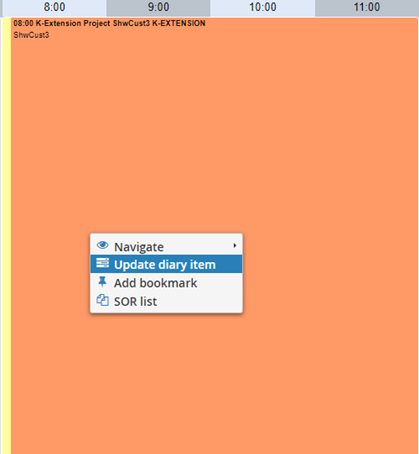
An enhancement has been made to the right click on the DRS Diary to allow Project Planner Diary items status to be updated.
Why have we done this?
Project Planner needed a product consistent method of providing manual Status Updates to Diary Items.
How will you benefit?
You can now update the status of published and non-published diary items, to ensure that any manual updates for any reason can be consistently provided to ensure Project Plans remain updated in line with activity.
Details of the change
On the right click, the option to now ‘Update Diary Item’ will be displayed;
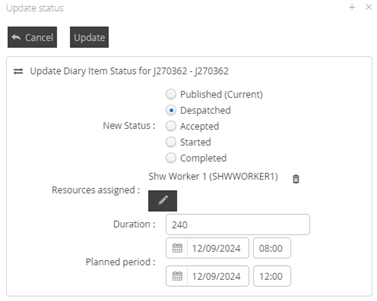
Selecting the option will display the Update Status menu modal
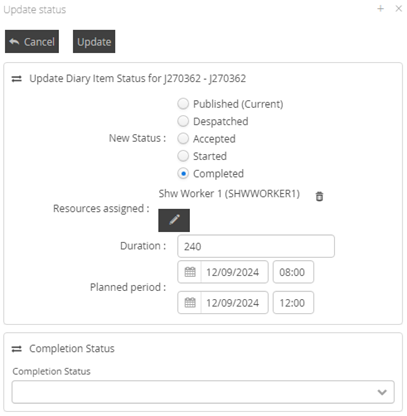
This function performs in the same way as the standard Update Status job modal, including when Completed is selected, where the option to update the Completion Status will be displayed
Fixes and Resolutions
Type | Issue | Description | Change Notes |
Issue Resolution | DRS-7765 | Planned Job Duration is occasionally not correct when using Manual Scheduling | Bad data format values were possible to pass into the date and time fields in Manual Assignment which could still successfully schedule a solution.
A change has been made to allow for poorly formatted date and time value, with validation errors showing when outside of the validation rules.
|
Issue Resolution | DRS-7822 | Jobs occasionally do not dispatch to mobile after being suspended and replanned | It was previously possible to suspend a Job with a status of NEW, which then applied incorrect status values to the Schedule Item objects. This was causing validation issues with despatch to mobile providers. A change has been made to ensure going forward, jobs with a status of NEW cannot be suspended.
|
Issue Resolution | DRS-7849 | Jobs cannot be edited or viewed if suspended while locked | Jobs which were LOCKED and then SUSPENDED and allowed to archive into the PAST were permanently locked and could not be edited.
This has been resolved and jobs which are LOCKED and then SUSPENDED within the archive can now be edited as required.
|
Issue Resolution | DRS-6836 | Bookmarks do not work correctly if assigned Workers are deleted | Deleting workers assigned to a Bookmark resulted in the Bookmark becoming invalid and it only loading the Diary Start page.
Diary Bookmarks will now validate the worker list against available workers and will display the remaining available workers. If all workers on a Bookmark are deleted, a warning will be displayed.
|
Issue Resolution | DRS-7179 | Duration Offset value in Job no longer valid. | The Duration Offset value is no longer relevant in DRS 6.1 This field has been hidden to improve data quality.
|
Issue Resolution | DRS-7184 | Diary Shortcuts to be renamed Diary Bookmarks | Diary Shortcuts have now been renamed Diary Bookmarks to be more consistent with the rest of the product.
|
Issue Resolution | DRS-7943 | Personal Bookmarks cannot be edited if global manage bookmark permission is not enabled | Personal Bookmarks could not be edited if the global Manage Bookmarks function was not enabled. This has been changed to allow Users to edit Personal Bookmarks that they have saved.
|
Issue Resolution | DRS-7957 | Adding Personal Unavailabilities does not warn users jobs will be suspended | A bug was found where a Personal Unavailability could be added using the Unavailabilities configuration menu and it did not warn the user that it could suspend jobs.
This has been resolved and the user will now be warned.
|
Issue Resolution | DRS-8124 | Project Planner Diary Template has some data issues | Additional data points have been added to the Diary Template. Data surfaced on datapoints have been verified against expected data.
|
Issue Resolution | DRS-8272 | Updating Diary Item status does not immediately reflect in planning board | Using the UPDATE STATUS button to update Diary Items was not updating the planning board after the change was saved. This has now been resolved and updates will be displayed after saving.
|
Issue Resolution | DRS-7792 | Worker sectors select list is not filtered for Agency configuration | When editing a worker’s sectors, all sectors were being displayed, even if Agency filtering was configured to be applied. This has now been resolved and Sectors displayed will be based on Agency filtering, unless the ‘show all sectors’ option is enabled.
|
Issue Resolution | DRS-8017 | On upgrade from DRS 5.7, Diary Bookmarks are not retaining display period | Diary Bookmarks were not maintaining their display period on the upgrade, based on the previous version configuration.
This has been resolved.
|
Internal Component Versions
Function | Version |
DRS Server (Kernel) | 6.3.1.9 |
Background Service | 6.1.15 |
Connector Services | 6.1.15 |
Inbound Connector | 6.1.15 |
Mobile Gateway | 6.1.15 |
Project Planner | 6.1.15 |
Utility Service | 6.1.15 |
DRS Web Services Gateway | 6.1.15 |
Archive/Housekeeping | 6.1.15 |
UK Geocoding Postcode Database | 07/2022 |
External Component Versions
Version | |
Apache | 2.4.62.0 |
Java | 8.372.07.1 |
MariaDB | 10.6.17.0 |
MariaDB Java Client (JDBC) | 3.1.2 |
php | 8.3.11.0 |
Tomcat | 9.0.95.0 |
Tomcat Native | 2.0.3.0 |
.Net | 4.7 |
SoapUI | 5.7.2 |