Dynamic Resource Scheduler
Whats New!
User Experience Changes
Security and Authentication
Modules and Utilities
Cyclical Scheduling - Configuration Interface
Cyclical Scheduling - Now Bulk Scheduling
Resource Quotas Improvements - Percentages
Architecture and Scheduling
Configuration
User Guides and Help
Get to Know Dynamic Resource Scheduler
How Does Dynamic Resource Scheduling Work
Speaking the Language of Scheduling
Navigating Dynamic Resource Scheduler
How your Data Links Together
Managing your Organisation
Viewing your Data
Your Customer Data
Your Service Orders
Your Jobs
Your Workers and Resources
Manage Your Tasks
Actioning your Jobs and Tasks
Job Templates
Find A Jobs Possible Workers
Locking Your Jobs
Create a Follow On Task
User Queues and Organising Your Tasks
Schedule and Organise
How to Optimise Your Scheduling
How to Schedule Manually
Scheduling Mutliple Jobs at Once
Reassign and Reschedule your Tasks
Managing Your Time and Durations
Managing your Comments and Contacts
Using Bookmarks to Drive Efficiency
Managing Your Job Status
Visualising Your Planning
Workers and Resources
Advanced Data Management
Creating Unavailability in your Workforce
Adding an Unavailability to an Individual Worker
Creating Unavailabilities for Multiple Days or Workers
Maps And Journey
Using Maps to Visualise Your Data
Using Maps With Your Data
Learn about our Closest Function
Your Journeys
Meetings and Non-Productive Planning
Administer Your Scheduler
Managing Your Organisations and Agencies
Managing Your Custom Data
Managing your Contracts
Customising Your Experience
Managing Depots and Starting Locations
Managing Diary Bookmarks
Managing your External Chart Views
KPI Settings
Managing Your Priorities
Learn about Sectors
Managing Your Follow On Templates
Get To Know Your Working Time Calendar
Managing your SOR Templates
Managing your Job Templates
Managing Your Vocabulary
Managing Your Bookmarks
Manage Your Customer Templates
Get to Know Import and Export
Managing Your Tenant Code Rules
Managing your Order Templates
Managing Your Unavailability Reasons
Get To Know Your Working Time Calendars
Managing your Worker Templates
Releases and Readiness
DRS 6, DRS 5.7 and Job Manager
User Guides and Help
Get to Know DRS
Dynamic Scheduling - How does it work
Navigating DRS
Vocabulary and Concepts
Customers
Orders
Jobs
Scheduling Jobs
Job Functions
Workers
Views
Object Inheritance
Agencies
DRS Modules
Scenario Based Planning
Managing your SMS Service
5.7 Documentation
Technical Documentation
Release Notes
DRS 6.1 Release Notes
DRS 6.1.22 - February 20, 2026
DRS 6.1.21 - September 10, 2025
DRS 6.1.20 - April 20th, 2025
DRS 6.1.19 - 11th April, 2025
DRS 6.1.18 - 13 February 2025
DRS 6.1.17 - 20th December 2024
DRS 6.1.16 - November 8th, 2024
DRS 6.1.15 - October 10th, 2024
DRS 6.1.14 - 6th September 2024
DRS 6.1.13 - 9th August 2024
DRS 6.1.12 Release Notes
DRS 6.1.11 Release Notes
DRS 6.1.10 Release Notes
DRS 6.1.9 Release Notes
DRS 6.1.8 Release Notes
DRS 6.1.7 Release Notes
DRS 6.1.6 Release Notes
DRS 6.1.5 Release Notes
DRS 6.1.4 Release Notes
DRS 6.1.3 Release Notes
DRS 6.1.2 Release Notes
DRS 6.1.1 Release Notes
DRS 6.1.0 Release Notes
DRS 6.0 Release Notes
DRS 6.0.0.0 Release Notes
DRS 6.0.0.1 Release Notes
DRS 6.0.0.2 Release Notes
DRS 6.0.0.3 Release Notes
DRS 6.0.0.4 Release Notes
DRS 6.0.0.6 Release Notes
DRS 6.0.1.0 Release Notes
DRS 6.0.1.1 Release Notes
DRS 6.0.1.2 Release Notes
DRS 6.0.1.3 Release Notes
DRS 6.0.1.4 Release Notes
DRS 6.0.1.5 Release Notes
Kirona Housing
Job Manager 9
Job Manager 9.3.0 - October 2024
Job Manager 9.1.0 - December 2022
Job Manager 9.2.0 - November 2023
Release Notes Disclaimer
Administering your Field Service Products
Supported Versions Policies
Contents
- All categories
- Dynamic Resource Scheduler
- User Guides and Help
- Administer Your Scheduler
- Learn about Sectors
Learn about Sectors

Sectors define the geographical areas used within DRS to organise work and resources. Customers are assigned to a single Sector based on their postcode, ensuring work is aligned to the correct location. Each Sector is linked to an Agency, which represents the top level of the geographical structure within DRS.
Work is allocated to Workers based on the Sectors assigned to them, determining where they can operate. This enables manageable and flexible scheduling, supporting efficient optimisation and clear organisation of your workforce.
Managing Your Sectors
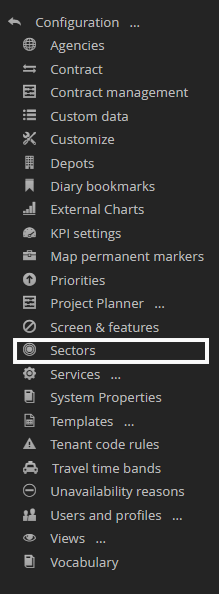
Sectors can be managed through the Sectors menu within the Configuration section of the application.
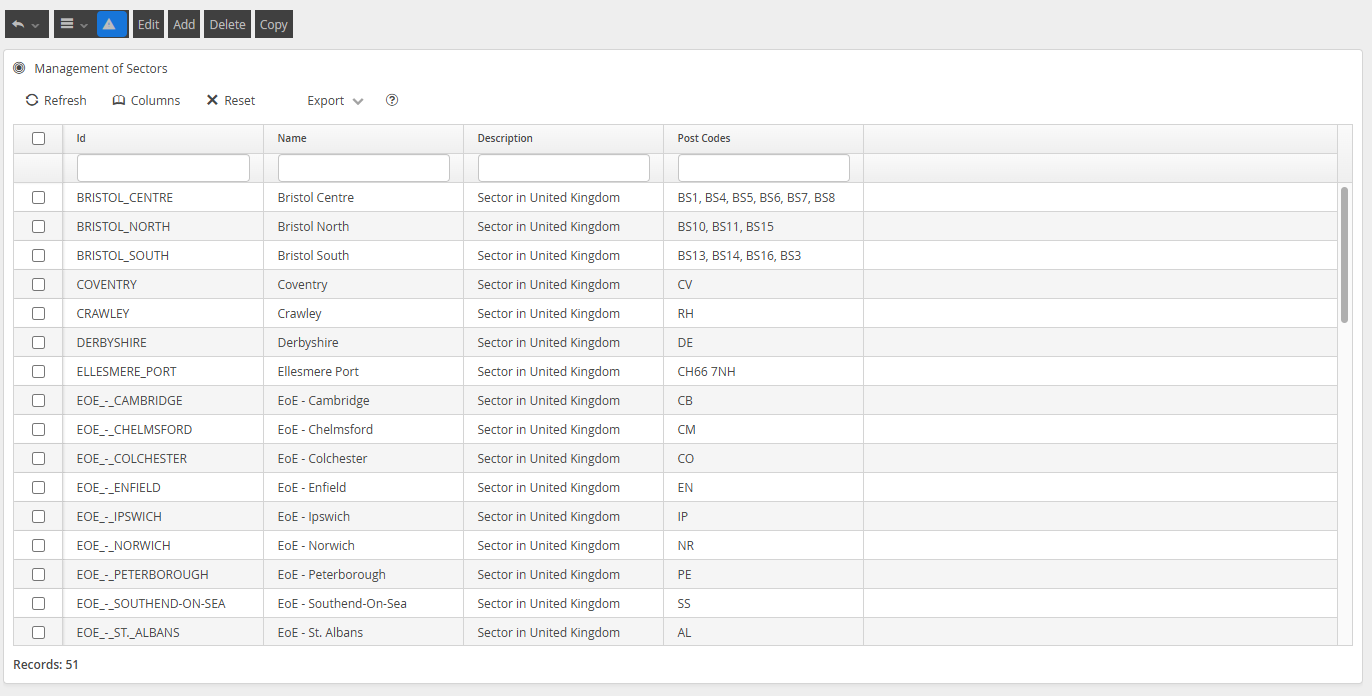
Your configured Sectors will be visible within this menu.
About Sector Postcodes
UK postcodes are structured to break down locations from broad geographic areas to very specific groups of addresses. Understanding this structure is important when configuring geographical models within DRS, particularly when defining Sectors and assigning work.
A full UK postcode is made up of two parts: the outward code and the inward code. Together, these define a precise location.
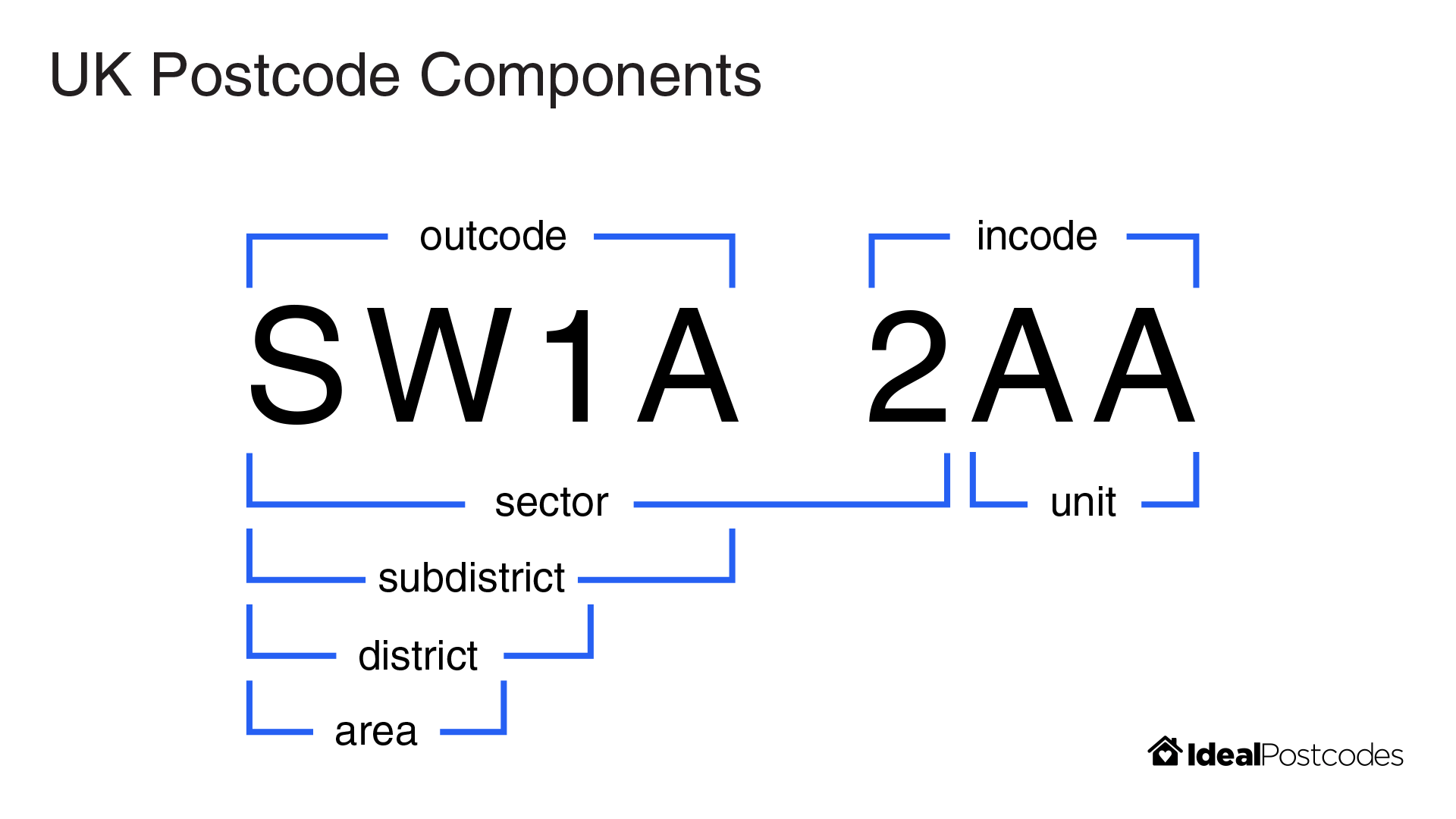
- Outward Code: identifies the broader area and district (e.g. EH1)
- Inward Code: identifies the sector and unit (e.g. 2NG)
Postcode Area
- The first one or two letters (e.g. EH, SW, M)
- Represents a major geographic area, often a city or region
- Example: EH = Edinburgh
Postcode District
- The area followed by one or two numbers (e.g. EH1, SW1A)
- Narrows the location to a district within the area
- Example: EH1 = central Edinburgh
Postcode Sector
- The district plus a single number after the space (e.g. EH1 2)
- Further refines the location within the district
- Commonly used for operational grouping and planning
Postcode Unit
- The final two letters (e.g. EH1 2NG)
- Represents a very small group of addresses (typically around 15 properties)
- This is the most precise level of the postcode
How this powers your Scheduling Solution
When configuring Sectors within DRS, postcode structure plays a key role in how work is grouped and scheduled. Sectors can be defined using any combination of postcode levels, allowing for highly granular and flexible configuration to suit your operational needs.
Sector mapping is applied from the most granular level to the least granular. This means that more specific postcode definitions take priority over broader ones when assigning Customers to Sectors.
For example, a Sector defined using a full postcode (e.g. EH1 2AA) and another defined at district level (e.g. EH1) may overlap geographically. However, a Customer with postcode EH1 2AA will be assigned to the more specific Sector, while Customers with postcodes such as EH1 2AB or EH1 9FR will fall back to the broader EH1 Sector if no more specific match exists.
This approach ensures precise control where needed, while still providing full coverage across all areas.
Using postcode sectors allows you to:
- Group work into logical, location-based clusters
- Assign Workers to clearly defined service areas
- Support efficient route optimisation and scheduling
- Maintain flexibility without creating excessive complexity
How To Manage Your Sectors
Clicking Add, or selecting a configured Sectors and clicking Edit or Copy, will present a screen to allow you to manage geographical configuration.
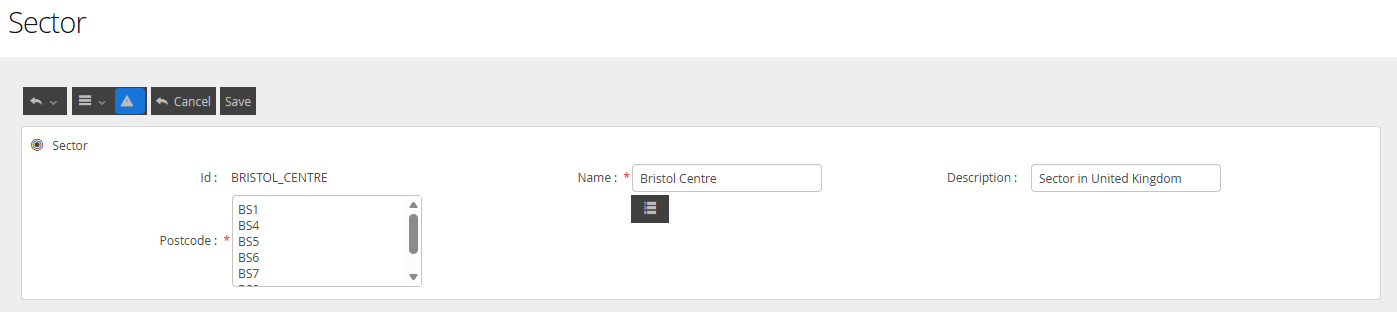
The fields available are defined in this way
Field Name | Description |
ID | This is the value the solver will use when computing the scheduling solution |
Name | This is the user-centric value that the user will be shown if the Sector value is selected on any data view or screen. It does not need to match the ID |
Description | This value can be used to help you understand the scheduling rules you used to define this sector. |
Postcode | This is the UK PostCode. The value entered in this field can only exist in a single Sector. |

Deleting a Sector
Deleting a Sector is a non-recoverable action and should be approached with care. While removing a Sector will not impact existing scheduled appointments, any jobs associated with the deleted Sector will no longer be optimised.
Additionally, any ongoing scheduling activity for jobs within that Sector may result in errors for users, as the system will no longer be able to resolve the required geographical assignment.