Dynamic Resource Scheduler
Whats New!
User Experience Changes
Security and Authentication
Modules and Utilities
Cyclical Scheduling - Configuration Interface
Cyclical Scheduling - Now Bulk Scheduling
Resource Quotas Improvements - Percentages
Architecture and Scheduling
Configuration
User Guides and Help
Get to Know Dynamic Resource Scheduler
How Does Dynamic Resource Scheduling Work
Speaking the Language of Scheduling
Navigating Dynamic Resource Scheduler
How your Data Links Together
Managing your Organisation
Viewing your Data
Your Customer Data
Your Service Orders
Your Jobs
Your Workers and Resources
Manage Your Tasks
Actioning your Jobs and Tasks
Job Templates
Find A Jobs Possible Workers
Locking Your Jobs
Create a Follow On Task
User Queues and Organising Your Tasks
Schedule and Organise
How to Optimise Your Scheduling
How to Schedule Manually
Scheduling Mutliple Jobs at Once
Reassign and Reschedule your Tasks
Managing Your Time and Durations
Managing your Comments and Contacts
Using Bookmarks to Drive Efficiency
Managing Your Job Status
Visualising Your Planning
Workers and Resources
Advanced Data Management
Creating Unavailability in your Workforce
Adding an Unavailability to an Individual Worker
Creating Unavailabilities for Multiple Days or Workers
Maps And Journey
Using Maps to Visualise Your Data
Using Maps With Your Data
Learn about our Closest Function
Your Journeys
Meetings and Non-Productive Planning
Administer Your Scheduler
Managing Your Organisations and Agencies
Managing Your Custom Data
Managing your Contracts
Customising Your Experience
Managing Depots and Starting Locations
Managing Diary Bookmarks
Managing your External Chart Views
KPI Settings
Managing Your Priorities
Learn about Sectors
Managing Your Follow On Templates
Get To Know Your Working Time Calendar
Managing your SOR Templates
Managing your Job Templates
Managing Your Vocabulary
Managing Your Bookmarks
Manage Your Customer Templates
Get to Know Import and Export
Managing Your Tenant Code Rules
Managing your Order Templates
Managing Your Unavailability Reasons
Get To Know Your Working Time Calendars
Managing your Worker Templates
Releases and Readiness
DRS 6, DRS 5.7 and Job Manager
User Guides and Help
Get to Know DRS
Dynamic Scheduling - How does it work
Navigating DRS
Vocabulary and Concepts
Customers
Orders
Jobs
Scheduling Jobs
Job Functions
Workers
Views
Object Inheritance
Agencies
DRS Modules
Scenario Based Planning
Managing your SMS Service
5.7 Documentation
Technical Documentation
Release Notes
DRS 6.1 Release Notes
DRS 6.1.22 - February 20, 2026
DRS 6.1.21 - September 10, 2025
DRS 6.1.20 - April 20th, 2025
DRS 6.1.19 - 11th April, 2025
DRS 6.1.18 - 13 February 2025
DRS 6.1.17 - 20th December 2024
DRS 6.1.16 - November 8th, 2024
DRS 6.1.15 - October 10th, 2024
DRS 6.1.14 - 6th September 2024
DRS 6.1.13 - 9th August 2024
DRS 6.1.12 Release Notes
DRS 6.1.11 Release Notes
DRS 6.1.10 Release Notes
DRS 6.1.9 Release Notes
DRS 6.1.8 Release Notes
DRS 6.1.7 Release Notes
DRS 6.1.6 Release Notes
DRS 6.1.5 Release Notes
DRS 6.1.4 Release Notes
DRS 6.1.3 Release Notes
DRS 6.1.2 Release Notes
DRS 6.1.1 Release Notes
DRS 6.1.0 Release Notes
DRS 6.0 Release Notes
DRS 6.0.0.0 Release Notes
DRS 6.0.0.1 Release Notes
DRS 6.0.0.2 Release Notes
DRS 6.0.0.3 Release Notes
DRS 6.0.0.4 Release Notes
DRS 6.0.0.6 Release Notes
DRS 6.0.1.0 Release Notes
DRS 6.0.1.1 Release Notes
DRS 6.0.1.2 Release Notes
DRS 6.0.1.3 Release Notes
DRS 6.0.1.4 Release Notes
DRS 6.0.1.5 Release Notes
Kirona Housing
Job Manager 9
Job Manager 9.3.0 - October 2024
Job Manager 9.1.0 - December 2022
Job Manager 9.2.0 - November 2023
Release Notes Disclaimer
Administering your Field Service Products
Supported Versions Policies
- All categories
- Dynamic Resource Scheduler
- User Guides and Help
- Get to Know Dynamic Resource Scheduler
- How Does Dynamic Resource Scheduling Work
How Does Dynamic Resource Scheduling Work

Field service scheduling solutions generally fall into three broad categories: Real Time Dynamic Scheduling, Batch Scheduling, and Point in Time Scheduling. While each approach can automatically generate schedules and respond to operational constraints, the way they calculate and update schedules differs significantly. Understanding these differences is important, as the scheduling method used can have a direct impact on efficiency, responsiveness and overall service performance.
The scheduling approach you choose influences how effectively you can operate, determining how many appointments can be offered, the cost of service delivery, and the number of resources required to meet your commitments.
Dynamic vs Other Scheduling Types
It's common for modern resource schedulers to refer to themselves as 'dynamic'. While each method can automatically generate schedules and respond to operational constraints, the way they deliver these benefits often differs wildly. They way each method approach calculating and maintaining the schedule differs significantly, and not all methods will consistently produce the most efficient outcome.
DRS provides Real Time Dynamic Scheduling typically delivering the highest potential efficiency. By continuously optimising worker diaries while respecting operational commitments and constraints, it adapts as conditions change. Compared with Batch or Point in Time approaches, this continuous optimisation can improve resource utilisation, reduce travel time and enhance overall service performance.
Dynamic | Batch | Point In Time | |
Optimisation | Real time optimisation respecting obligations, improving scheduling at every possible point. | Initial appointment is offered a dynamic appointment based on availability and some defined factors. Diaries are optimised overnight but suffer the limitation of optimising an unoptimised appointment. | Appointments are provided at the point of contact following defined scheduling rules. Appointments may or may not be best in slot. |
Skills Match | Match worker abilities | Match worker abilities | Match worker abilities |
Geolocation | Geolocation matching for available worker | Geolocation matching for available worker | Optional geolocation match for available worker |
New Task Optimisation | Optimised at the point of initial appointment offering. | Best attempt at quality at the point of appointment offering | Attempt at quality based on current data at the point of appointment offering |
Task Update | Diaries are optimised when jobs are updated | No optimisation when jobs are updated | No optimisation when jobs are updated |
Additional Job Optimisation | Diaries are optimised when jobs are added | No optimisation when jobs are added | No optimisation when jobs are added |
Overnight Optimisation | Whole availability optimisation for all scheduled jobs in the future | Availability optimised overnight for the next scheduled day | No overnight optimisation |
Travel Time and Distance | Potential for low travel time between jobs | Potential for medium travel time between jobs | Potential for high travel time between jobs |
User Effort | Potential low level of user management required | Medium level of user management required | High level of user management required |
How Does DRS Optimise?
When a job is to be scheduled, or a diary is to be optimised, the scheduler first identifies all the workers with matching abilities and sector.
When there are existing routes, DRS will use a series of steps to ensure that each possible option for the scheduling of the job is considered to find the smallest addition to Total Global Travel Time.
In this example, we are presented with two existing worker schedules, filled with previously agreed appointments, and given a new red job to fit in.
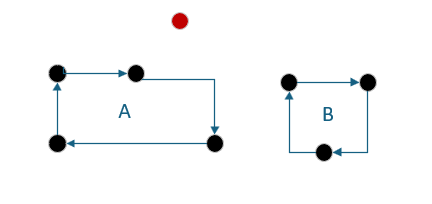
When considering the possible appointments, DRS will attempt to move as many jobs around as necessary to provide your customers with the best availability your business can offer.
DRS has found an opportunity to add the new red job to the schedule of worker A, but in doing that, has left a job previously allocated to worker A unscheduled.
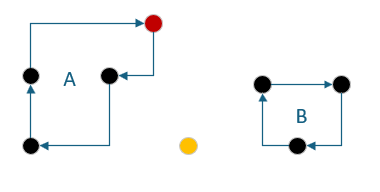
It can do this, because in assessing the route for worker B, we can provide an optimal solution that reduces Total Global Travel Time while ensuring that your jobs are optimally scheduled.
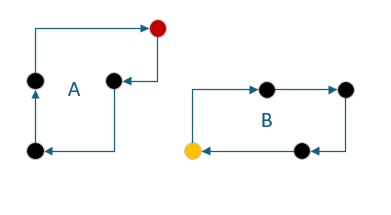
By moving multiple scheduled jobs, but still respecting the constraints of the appointment, we can ensure the maximum number of tasks can be completed with the least increase in Total Global Travel and Overheads.
Of course there may be many routes within which the yellow job could be inserted, and this could in turn lead to other jobs being moved, which may then end up in a solution that cannot be resolved. The scheduler decides which direction is the most promising and will try the other directions only if the first one did not lead to a good solution. It uses the increase in global travel time to evaluate the solution.
Optimising Schedules in the emerging day
When the day starts an assumption is made that the schedule has been optimised and we are starting with the schedule that we want to run with for the day.
Whenever we receive an update from the mobile device (Accepted, Started, Completed) an attempt is made to re-schedule each of the jobs for the worker in question for the rest of the day.
In effect this means that the scheduler will attempt to move the job if it now can’t be completed in the day, otherwise no changes will take place. Because the scheduler is assessing impact on Global Travel Time the best scheduling solution is usually to keep the jobs where they are. If during the optimisation the scheduler finds a better route to improve Total Global Travel Time, DRS will perform these schedule changes to ensure we are meeting our requirements in the most optimal way.