Contents
- New and Improved Functionality
- Fixes and Resolutions
- Drag and Drop in Planning Board does not populate the possible workers dropdown
- Bulk unavailability is not being added to all operatives
- Error message: unable to modify operative without suspending jobs when attempting to modify operative
- Internal Error when attempting to modify working hours calendar
- Working hours calendar do not auto populate on any new Operatives made in the system
- Unresponsive views after creating local view
- Login and Actions take too long for their first attempt
- Multi-Kernel: Error when saving roster calendar with multiple daily schedule types
- Bad error message when attempting to specify already specified projects
- Make sure we can revert a package to planned/published if the right is set on the profile
- Issues should not be recorded if project is Planned or Published with unspecified SOR’s
- Fixed: Project View - Package sub-list buttons not following the same enable/disable rules as those at the top
- Project View - package sub-list 'Sequence editor' button - remove check to select a Project package
- Manage Bookmarks does not auto refresh the popup after renaming
- Period start and Period end columns in package sub-list are empty when Specified from Project list page
- View Column Sizes do not size as intended
- Known Issues
- Internal Component Versions
- External Component Versions
DRS 6.1.13 - 9th August 2024

- New and Improved Functionality
- Fixes and Resolutions
- Drag and Drop in Planning Board does not populate the possible workers dropdown
- Bulk unavailability is not being added to all operatives
- Error message: unable to modify operative without suspending jobs when attempting to modify operative
- Internal Error when attempting to modify working hours calendar
- Working hours calendar do not auto populate on any new Operatives made in the system
- Unresponsive views after creating local view
- Login and Actions take too long for their first attempt
- Multi-Kernel: Error when saving roster calendar with multiple daily schedule types
- Bad error message when attempting to specify already specified projects
- Make sure we can revert a package to planned/published if the right is set on the profile
- Issues should not be recorded if project is Planned or Published with unspecified SOR’s
- Fixed: Project View - Package sub-list buttons not following the same enable/disable rules as those at the top
- Project View - package sub-list 'Sequence editor' button - remove check to select a Project package
- Manage Bookmarks does not auto refresh the popup after renaming
- Period start and Period end columns in package sub-list are empty when Specified from Project list page
- View Column Sizes do not size as intended
- Known Issues
- Internal Component Versions
- External Component Versions
Development of DRS Version 6.1.13 is now complete and was released in August, 2024. DRS 6.1.13 Contains a number of QOL updates, component upgrades and fixes to ensure the product remains stable and secure. It can be deployed as a patch to version 6.1.12.
New and Improved Functionality
QOL Improvement: Project Planner Manual Scheduling (DRS-8141)
What have we done?
Changes have been made to the Project Planner Manual Scheduling to improve the way we manage the scheduling of small and large scale Project Packages.
Why have we done this?
Improving the way we deliver Manual Planning within Project Planner will improve the way planning for complex projects can be delivered when standard Project Scheduling rules do not accurately fit the required scenario.
How will you benefit?
UI improvements will ensure Manual Scheduling is a quicker process, delivering a more consistent feel across the scheduling tasks.
Details of the change
Several Improvements have been made to the display and functionality of the Manual Scheduling option available for Project Planner.
When the Start Time date is changed, the End Time date will now automatically update to match. Additionally, The scheduled day of the week will now be shown on the left hand side of the date selected. This will update as the start time is selected.
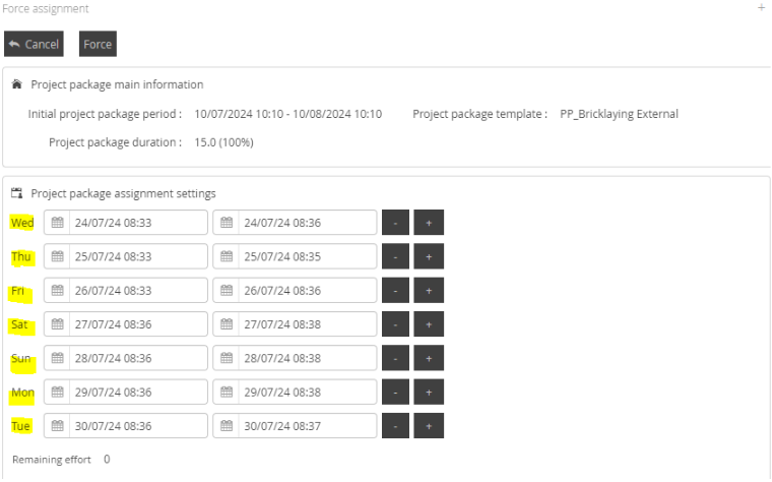
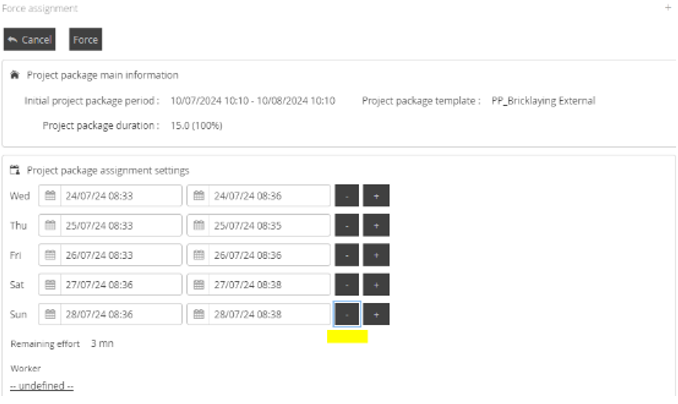
It is now possible to remove the first ‘default’ appointment created when selecting Manual Scheduling for the first time. If the ‘-‘ button is selected, the focus will be set to the next ‘-‘ button.
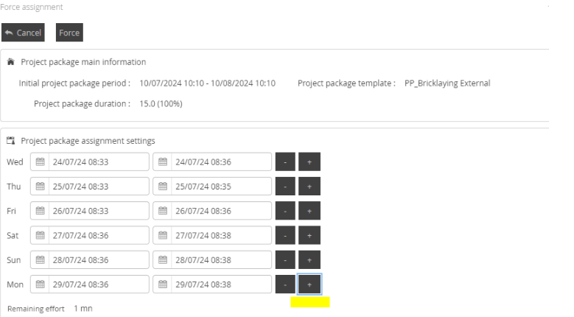
When selecting the ‘+’ button for a new appointment, a new appointment will be made following the thread of the clicked ‘+’ button. If the Remaining Effort value is smaller than the previous appointment selected, the maximum available time will be scheduled to ensure the Remaining Effort is set to 0, If the Remaining Effort is greater than the previous appointment time window, the Time Window will be duplicated.
Additionally, clicking the ‘+’ button once will set the focus to the ability to add additional appointments. The ENTER key on your keyboard can now be used to create the remaining appointments, which will follow the sequence of appointments previously set out.
QOL Improvement: Close Project action has been reviewed and Improved (DRS-7110)
What have we done?
The Close Project function within the Project and Project Details screens have been improved.
Why have we done this?
The close project button had some conflicting messaging and did not perform consistently across the project. This has now been improved.
Currently the function considers the state of the Project and Project Packages and offers the user several different options, depending on the status. This is both confusing and creates the opportunity for errors to occur.
How will you benefit?
Reducing the complexity of consistent functionality will provide an easier and more supportable solution for the end user.
Details of the change
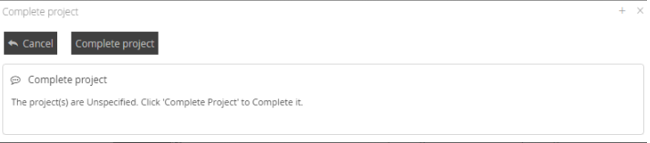
This has now been renamed ‘Complete Project’. Confirmation messages have been changed to provide a consistent and easy to understand choice for the user.
An example of a confirmation message is below.
Component Update: Apache 2.4.61
What have we done?
Apache 2.4.61 will now be deployed as part of the full release and patches and can be deployed as part of the stand alone upgrade process.
Why have we done this?
Component updates ensure we remain compliant and secure against known issues and threats.
How will you benefit?
Component updates ensure we remain compliant and secure against known issues and threats.
Details of the change
DRS will now be deployed with Apache 2.4.61. This will also be available through the direct deployment mechanism for all customers on a version greater than 6.1.3.
NOTE: A Manual Command is required to be run on upgrade to ensure this deploys. Please read the README file within the release for more information.
Fixes and Resolutions
Type | Issue ID | Description | Change Notes |
Issue Resolution | DRS-6905905 | Drag and Drop in Planning Board does not populate the possible workers dropdown | An error was reported when using Drag and Drop on the planning board. The Worker list would not show an appropriate selectable worker and as a result, Drag and Drop would fail. 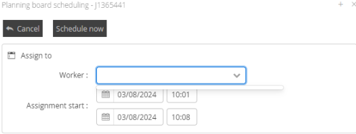 This now displays correctly when selected. 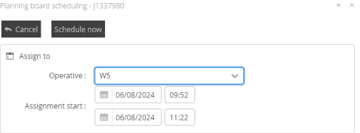 |
Issue Resolution | DRS-7748 | Bulk unavailability is not being added to all operatives | When using the Daily Unavailability’s function to add multiple unavailability’s to multiple workers, the function was reporting an incorrect completion status, indicating a success when encountering a partial or complete failure. This was a result of an incorrectly set parameter on the function. This has now been resolved and Unavailability’s will add as expected or report the appropriate failure response. |
Issue Resolution | DRS-8005 | Error message: unable to modify operative without suspending jobs when attempting to modify operative | An error was found when the modifications were made to workers which may result in changes to both the historical and future schedule. This change resulted in the Kernel providing an invalid response to the request to consider the impact of the change requested in relation to the scheduled tasks. Changes have been made to ensure that changes made to Worker objects resolve correctly. NOTE: Hotfixes were deployed for versions 6.1.10, 6.1.11, 6.1.12 to resolve this issue. All customers who had this deployed are recommended to upgrade to this version to ensure they remain on a long term supported release. |
Issue Resolution | DRS-7404 | Internal Error when attempting to modify working hours calendar | An error was found when the modifications were made to workers which may result in changes to both the historical and future schedule. This change resulted in the Kernel providing an invalid response to the request to consider the impact of the change requested in relation to the scheduled tasks. Changes have been made to ensure that changes made to Worker objects resolve correctly. NOTE: Hotfixes were deployed for versions 6.1.10, 6.1.11, 6.1.12 to resolve this issue. All customers who had this deployed are recommended to upgrade to this version to ensure they remain on a long term supported release. |
Issue Resolution | DRS-7722 | Working hours calendar do not auto populate on any new Operatives made in the system | When new Workers are created, the default Working Hours Calendar assigned to the Agency will now be correctly populated. |
Issue Resolution | DRS-7723 | Unresponsive views after creating local view | It has been possible to create a combination of columns and filters which resulted in a view which would disable itself and cause other views to become unresponsive. Views capable of causing this issue are no longer possible. |
Issue Resolution | DRS-7940 | Login and Actions take too long for their first attempt | It was possible in v5.7 to have user states which set the context of the User object to ‘upgrade’ rather than ‘user’ following a successful DRS 6.1 upgrade. This caused DRS to run compatibility scripts for the user before the first successful action on each login. This user state is no longer possible as part of v6.1 upgrades. |
Issue Resolution | DRS-8041 | Multi-Kernel: Error when saving roster calendar with multiple daily schedule types | When attempting to change roster types, an incorrect check was being made to ensure the proposed changes were valid in the context of Multi Kernel instances. This resulted in an invalid state being returned from the check and an unclear error message returned to the User. This check has now been made more specific in the context of Multi Kernel instances and no longer results in an invalid state returned. |
Issue Resolution | DRS-6783 | Bad error message when attempting to specify already specified projects | Improvements have been made to the language used on the error message. |
Issue Resolution | DRS-7117 | Make sure we can revert a package to planned/published if the right is set on the profile | A new function has been added to allow users to change the status of Project Packages to Planned or Published as required. The user will be prompted with the following dialogue. 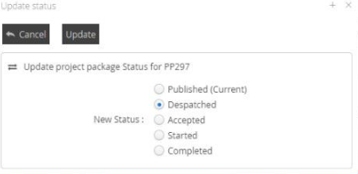 If the package is Published at the time of change, the Unpublish function will run to remove the Appointment from DRS. The ability to use this feature is controlled by the USER PROFILE permission set. |
Issue Resolution | DRS-8112 | Issues should not be recorded if project is Planned or Published with unspecified SOR’s | As SOR’s are allocated to Project Packages on Specify, no SOR’s remain on Projects once specified. If attempting to Specify a project with no new or available SOR’s to specify, the error was poorly worded and confusing. This has now been improved. |
Issue Resolution | DRS-8136 | Fixed: Project View - Package sub-list buttons not following the same enable/disable rules as those at the top | All Sub List buttons will now follow the same display rules as the main Parent object they are attached to. |
Issue Resolution | DRS-8139 | Project View - package sub-list 'Sequence editor' button - remove check to select a Project package | Sequence Editor can now be accessed without first selecting a Project Package. |
Issue Resolution | DRS-8146 | Manage Bookmarks does not auto refresh the popup after renaming | The Bookmark Manager view was not auto-refreshing after a change to a bookmark was made. This will now refresh automatically as expected. |
Issue Resolution | DRS-8149 | Period start and Period end columns in package sub-list are empty when Specified from Project list page | If a Project was specified from the Project List page, some Sub list column data was not correctly refreshed for display. This is now resolved. |
Issue Resolution | DRS-7706 | View Column Sizes do not size as intended | A previous change to resolve other sizing issues has caused the wrong column size value to be selected when users quickly change between views and different objects. This results in users being displayed columns using the default column width rather than any other specifically configured column width. This has now been resolved and the correct column width will be displayed. |
Known Issues
Type | Issue ID | Description | Change Notes |
Known Issue | DRS-8005 | Error message: unable to modify operative without suspending jobs when attempting to modify operative | All customers who have previously encountered this issue and taken a Hotfix to resolve in place are encouraged to upgrade to 6.1.13 at their earliest convenience to remain on the main branch of supported product |
Known Issue | DRS-7404 | Internal Error when attempting to modify working hours calendar | All customers who have previously encountered this issue and taken a Hotfix to resolve in place are encouraged to upgrade to 6.1.13 at their earliest convenience to remain on the main branch of supported product. |
Internal Component Versions
Function | Version |
DRS Server (Kernel) | 6.3.1.9 |
Background Service | 6.1.13 |
Connector Services | 6.1.13 |
Inbound Connector | 6.1.13 |
Mobile Gateway | 6.1.13 |
Project Planner | 6.1.13 |
Utility Service | 6.1.13 |
DRS Web Services Gateway | 6.1.13 |
Archive/Housekeeping | 6.1.13 |
UK Geocoding Postcode Database | 07/2022 |
External Component Versions
Description | Version |
Apache | 2.4.61.0 (From 2.4.59.0) |
Java | 8.372.07.1 |
MariaDB | 10.6.17.0 |
MariaDB Java Client (JDBC) | 3.1.2 |
php | 8.3.8 (From 8.3.7) |
Tomcat | 9.0.75.0 |
Tomcat Native | 2.0.3.0 |
.Net | 4.7 |
SoapUI | 5.7.2 |