Contents
DRS 6 Technical Environment Specification

Article Purpose
The purpose of this article is to give IT and business staff an understanding of how the Advanced Dynamic Resource Scheduler (DRS) is structured and the technical requirements that are required for a successful deployment.
Scope
The scope of this document is to cover the structure of the system, such as the database architecture, application architecture (layers), data flow and user interface. The document explains the platforms supported, server specifications, any third party licensing, live and test environments and integration with third party products.
Definitions
Apache – Application HTTP web server
Tomcat – Java servlet container and web server
VPN – Virtual Private Network
HTTP – Hypertext Transfer Protocol
HTTPS – Secure encrypted Hypertext Transfer Protocol
MariaDB - Relational Database - 100% open source from the founders of MySQL
HeidiSQL - SQL Query Tool
DRS Instance - DRS environment composed of a single web server and one or more scheduling servers. In exceptional circumstances an install may consist of multiple DRS instances.
DRS Web Server - Presentation and RDBMS database layer. The presentation layer consists of Apache and Java applications deployed within multiple Tomcat containers. The RDBMS database layer uses MariaDB to store the DRS data.
DRS Scheduling Server - Server where the scheduling engine and memory resident database reside
Kernel - Another name for the scheduling engine and memory resident database. There can be one or more kernels split across one or multiple DRS scheduling servers
Technical Architecture
DRS 6 Core Technology Stack
The current Technology Stack version at our latest release can be found here: Current Technical Architecture
The noted technology stack is installed with DRS in a way that a standard server update will not update them (except for Microsoft Excel).
For example, Java is commonly installed on servers, whatever version of Java is installed, DRS will use its own release that is shipped with the DRS product. Updating the Java version on the server using the standard methods will not impact DRS.
Updating the bundled technology stack is not permitted and will only be updated via a formal DRS release. Updates to the Technology Stack are regularly provided at each Major release and all necessary patch releases.
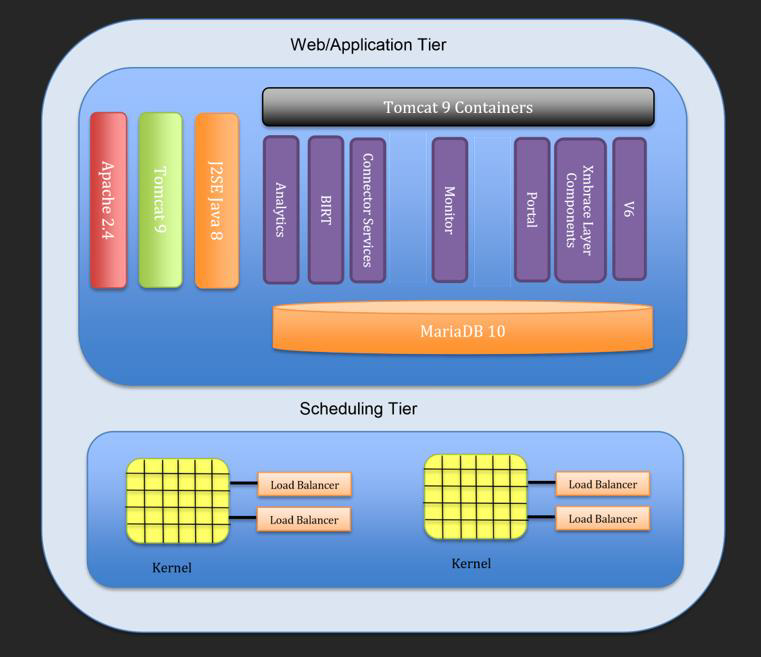
The diagram below shows the technical/software components in use and the logical layout. The DRS instance can be deployed on a single server, split across a web and scheduling server or over a single web server and multiple scheduling servers. Apache is also installed on the scheduling tier if the web and scheduling tier are on separate server.
Web/Application Tier
The DRS 6 web/application tier is only supported on Windows Server and comprises of a number of different applications, mainly Java and PHP deployed within Apache HTTP server and Apache Tomcat. Apache server can be configured to use SSL (Secure Socket Layer) to encrypt the network traffic (HTTPS - TLS 1.2) to and from the web server. Unless hosted in the Advanced Public Cloud, SSL Certificates are the responsibility of the customer to provide. Apache HTTP(S) communicates with Tomcat using Tomcat Connectors using mod_proxy_http. For each DRS instance there will only be one web/application server.
The web tier serves a number of purposes one of which is the web user interface accessed via a web browser. The web application communicates with the DRS scheduling server where the Kernel(s) reside.
The web/application tier is also where the RDBMS persistent database resides, this uses MariaDB. HeidiSQL can be used as a SQL client to run SQL queries, edit tables, stored routines etc. MariaDB is also used for reporting usually via InfoSuite which is a business intelligence reporting tool. Infosuite has an object layer which sits on top of the standard MariaDB tables and views. It is common practice for the production MariaDB database to be replicated to a separate Windows server where Infosuite is installed, this separates the server resources required for reporting from the production DRS environment for performance purposes.
The DRS web/application tier also serves as the integration layer for third party applications. This is either by the use of a shared file system or FTP using flat file transfers or web services using SOAP/XML. DRS can provide the scheduling solution for many different types of applications.
Scheduling Tier
The web/application tier communicates with the scheduling tier over a proprietary protocol over TCP. The Kernel is a 32-bit application written using C++. The Kernel is a complex scheduling tool which utilises artificial intelligence algorithms to optimise tasks / appointments to improve workforce efficiency.
A schedule request is a highly computational expensive operation which asks the Kernel to find the most optimal / efficient time slot in which a task can be carried out. There are many factors that can affect the time taken for the Kernel to compute the most optimal slot, so careful consideration needs to be taken when designing the Kernel and when also provisioning the hardware that it sits on.
Kernel design falls outside of the scope of this document, however the following factors and limitations need to be considered when designing the Kernel.
• Number of operatives / workers in a Kernel
• Number of jobs / tasks in a Kernel
• Number of workers suitable for the jobs
Typically a single Kernel can handle up to 300 - 450 workers, depending on multiple criteria.
DRS Agencies
In DRS terms an agency is made up of customers (properties), service orders, jobs and workers. A customer can belong to one and only one agency. A customer can be assigned to service orders and a jobs only belonging to the same agency and the jobs can be executed only by the workers in the same agency. An agency can only exist within one Kernel, however multiple agencies can exist in a single Kernel.
One worker cannot move from one agency to another, so the jobs that need scheduling and the workers who can carry out the work must exist in the same agency (same Kernel).
Customers who have a higher number of workers than a single Kernel can handle will need to look at creating a multi Kernel environment. This means that the workers and jobs need to be siloed into separate agencies which can then be separated into multiple Kernels. Typically this is done by geographical location.
Third Party Software and Licensing
The following software stack are all open source components and not subject to separate commercial licensing.
• MariaDB 10.1
• MariaDB Replication
• Apache HTTP Server
• Apache Tomcat
• Java SDK
• PHP
Note: ODBC MySQL client is required for DRS operation. As per its licencing condition, Advanced does not provide this component and the customer must download it explicitly.
Browser Support
The DRS interface is accessed via a web browser. DRS has been certified with the following desktop applications:
Function | |
Browser Support | Google Chrome, Chromium, Microsoft Edge |
Advanced do not test against any virtual desktop environment, however we have many customers using Citrix and other virtual desktops without any known problems.
Server Specifications
Supported Operating Systems
Both the DRS web and scheduling tiers are only supported on Windows Server. DRS 6 is supported against the following Windows Server environments:
• Windows Server 2016
• Windows Server 2019
• Windows Server 2022
DRS can happily exist on either a physical or virtual environment. Due to the complexity of the DRS scheduling and the varying factors that can affect the number of permutations, Advanced recommends the deployment of DRS to be located on a virtual environment. This gives the flexibility to add or reduce resource if needed. This may be needed if a change is made to the number of users, jobs, slots etc.
This document will cover the minimum server resource requirements based on Advanced’s experience to date.
Live DRS Server Specifications
Server specifications are dependent on the number of workers, jobs, time slots, planners, users, the scheduling horizon and the data retention period.
The specifications below have been used to benchmark the DRS server requirements.
6 months data retention period |
DRS scheduling horizon < 2 weeks |
Timeslots per day <=5 |
Possible workers per job < 10 |
Only Intel processors are supported for the DRS instance. AMD processors are not supported.
In order for DRS to perform well, it is important to choose as fast a processor as possible. The clock speed alone is not an indication that the processor will perform well. An Intel 2.2GHz processor can outperform a 2.6GHz dependant on model and version of the processor.
You can use the www.spec.org website to compare processor performance. Only the Spec Integer rate by throughput is important when comparing processor performance for DRS. The SpecInt2006 rate has now been closed off and replaced with SpecInt2017, however not all processors are covered in the 2017 results. We would recommend searching on both if your processors are older than a year.
By performing an advanced query you can compare the Spec Integer rate by throughput querying by model and other criteria to compare processor speeds. Note
DRS does not use multi-threading, so we are comparing on single thread throughput.
https://www.spec.org/cgi-bin/osgresults?conf=rint2006;op=form
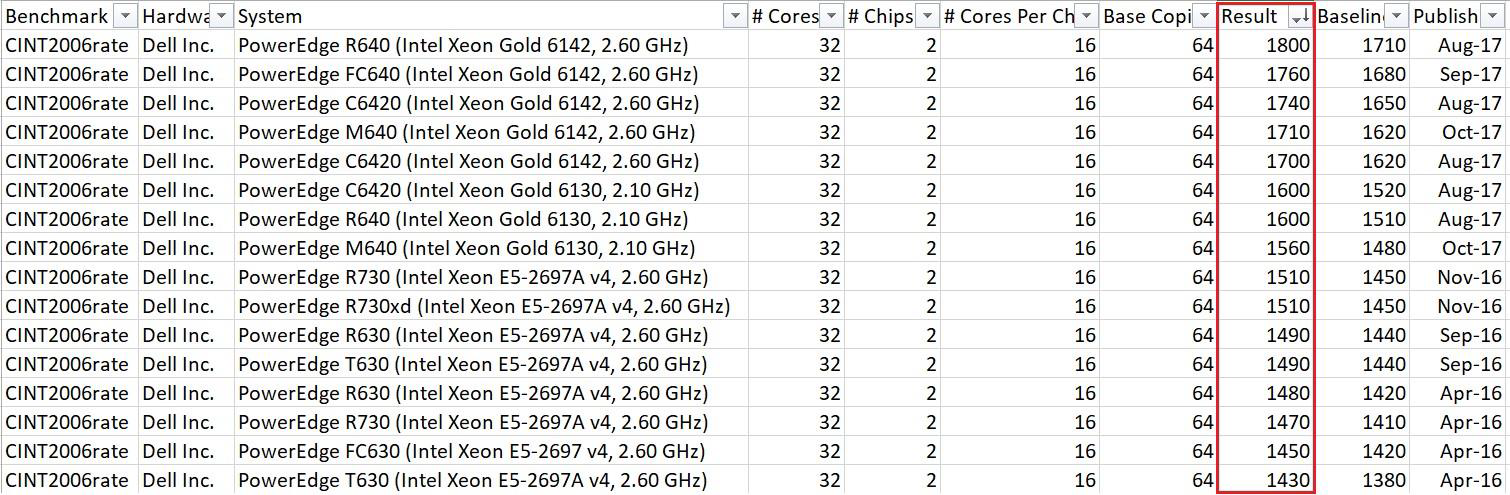
The example query below brings back the Specint result for all Dell dual socket processors which have a total of 32 cores. You can export this to a CSV file and sort by result.
The higher the result the better DRS will perform
CPU, Memory and Disk Requirements
The following specifications use virtual CPU’s, which for most virtualisation software will be at the logical CPU level (thread).
Disk should be as fast as possible, preferably Solid State SAN based storage, offering redundancy, with fast single block and multi block reads connected using Fibre Channel or SAS.
DRS - Single Web and Scheduling Server up to 300 Operatives
Number of Users | vCPUS | Memory | Disk GB |
01-50 | 6 | 16 | 120 |
51-100 | 6 | 16 | 120 |
101-150 | 8 | 16 | 150 |
151-200 | 8 | 24 | 180 |
201-300 | 10 | 32 | 200 |
DRS - Separate Web and Scheduling Server - 300 to 600 Operatives
Number of Users | vCPU's | Memory | Disk GB |
301-400 | 6 | 16 | 150 |
401-500 | 8 | 20 | 200 |
501-600 | 8 | 24 | 200 |
Test DRS Server Specification
Commonly the test environment is used for testing upgrades and functionality only. It’s not used for load testing. As a result the test server can be a cut down version of the live environment. Generally this will be on a single Web and Scheduling server even if the live environment is split across more than one server.
Below is the recommended specification for a generic test environment.
Number of Users | vCPU's | Memory GB | Disk GB |
1-50 | 4 | 12 | 200 |
Environment Provisioning
Installation
The installation of the DRS Environments are performed remotely and once installed a technical document explaining environments and where software is installed is sent to the customer.
Advanced will install a live and a test environment and both these environments are covered by the standard Advanced support contract. Additional environments will require an additional level of support.
During implementation phase of DRS the live environment will be used for testing purposes. This makes sure that during the testing phase and pre go live, all potential live configuration and set up problems will have been ironed out. Once a customer is live, the test environment is built, which involves installing DRS, performing a full account backup of live and importing the account into the test DRS instance. System parameters are then updated as necessary.
Anti-Virus and Scanning Software
Advice on this can be provided on a case by case basis and should be agreed before implementation begins.
Network Traffic
DRS is typically a back office application so should not be available over the Internet unless there is a specific business reason to do so. If for any reason the application is available over the Internet then SSL should be enforced and IP whitelisting used to control user access.
User access and web service integration to the web server is over either HTTP (port 80) or HTTPS (443).
Internally DRS will use a wide range of network ports which allows all the DRS components to communicate with each other.
Component | Ports |
TOMCATxPORTAL | 8000 |
TOMCATxBIRT | 8005 |
TOMCATxGROUPJOBSERVICE | 8020 |
TOMCATxANALYTICS | 8025 |
TOMCATxMONITOR | 8010 |
TOMCATxGEOCODER | 8015 |
TOMCATxOD | 8031 |
TOMCATxCS | 8031 |
TOMCATxCUSTOM | 8034 |
TOMCATxBG | 8212 |
TOMCATxWEB | 8112 |
TOMCATxV6 | 8032 |
MariaDB | 3306 |
DRS KERNEL | 4010 - 4012 |
Mobile Gateway | 3510 |
Ports 8000+, 3500+, 3600+ and 4000+ on the DRS Web and Scheduling Server communicate using web service calls.
Ports 8000+ and 4000+ need to make database queries.
Ports 3500+ and 14000+ on the DRS Scheduling Server are accessed externally by Mobile working and external client processes.
TCP port 4000+ is used by the DRS Kernel will use the , it will also use TCP port 3998 to communicate with TOMCATxGEOCODER
Ports 8000+ for the Tomcat application are used internally on the DRS Web server and are not accessed from any external systems.
TCP Port must not be blocked between the web and the scheduling server
DRS is normally accessed by users and any other systems from the standard HTTP and HTTPS port
Exceptions
• If integrated with the MobileGateway, port 3510 (by default) must be reachable from 3rd party system
• If ProjectPlanner Core (pre 6.1.0) is in use, ProjectPlanner runs on the end user PC and requires access to the MariaDB 3306 TCP port
Kernel - Memory Resident Database
The kernel requires immediate access to every object that requires scheduling. The kernel’s memory resident database keeps all objects available in memory. For resilience purpose, every job change in memory is dumped to disk. If one scheduling request changes 10 jobs then these 10 job changes are saved to disk. Every 500 changes, a full memory “dump” is created on the disk
Backups
The DRS installation automatically comes with backup file generation procedures. These backup procedures create backup files on the server itself, also with a daily restart of the application.
If the customer hosts their own DRS environment it is their responsibility to:
• Make sure the backup files are created every day
• Secure backups by copying backup files to another file system location or to tape.
• Perform full server backups
On Premise vs Advanced Cloud
Advanced DRS can be hosted by the customer in their own data centre or Advanced can provide a fully hosted solution in the Advanced Cloud, which can also include enhanced level of support covering managed OS, managed backups and disaster recovery.
In all deployment solutions Advanced requires an SMTP access route for outbound emails from the Advanced servers. This is for license & account management and proactive system health monitoring.
These outbound emails contain no sensitive or personally identifiable data and are sent to a central Advanced licensing & monitoring service. The same route will be used for any iAlert events which would be configured in your solution.
Full On-Premise
The customer is responsible for providing sufficiently spec’d hardware, configuring and securing network traffic, looking after the administration of the OS and application including backups and possible need for DR. Advanced will provide hardware specifications based on the number of users.
Advanced Private Cloud
Advanced offers a complete hosting and management solution to customers running Advanced DRS or any of the other Advanced products. For more information regarding Advanced cloud services, please contact your account manager.
A white-paper is also available for download from www.OneAdvanced.com