Dynamic Resource Scheduler
Whats New!
User Experience Changes
Security and Authentication
Modules and Utilities
Cyclical Scheduling - Configuration Interface
Cyclical Scheduling - Now Bulk Scheduling
Resource Quotas Improvements - Percentages
Architecture and Scheduling
Configuration
User Guides and Help
Get to Know Dynamic Resource Scheduler
How Does Dynamic Resource Scheduling Work
Speaking the Language of Scheduling
Navigating Dynamic Resource Scheduler
How your Data Links Together
Managing your Organisation
Viewing your Data
Your Customer Data
Your Service Orders
Your Jobs
Your Workers and Resources
Manage Your Tasks
Actioning your Jobs and Tasks
Job Templates
Find A Jobs Possible Workers
Locking Your Jobs
Create a Follow On Task
User Queues and Organising Your Tasks
Schedule and Organise
How to Optimise Your Scheduling
How to Schedule Manually
Scheduling Mutliple Jobs at Once
Reassign and Reschedule your Tasks
Managing Your Time and Durations
Managing your Comments and Contacts
Using Bookmarks to Drive Efficiency
Managing Your Job Status
Visualising Your Planning
Workers and Resources
Advanced Data Management
Creating Unavailability in your Workforce
Adding an Unavailability to an Individual Worker
Creating Unavailabilities for Multiple Days or Workers
Maps And Journey
Using Maps to Visualise Your Data
Using Maps With Your Data
Learn about our Closest Function
Your Journeys
Meetings and Non-Productive Planning
Administer Your Scheduler
Managing Your Organisations and Agencies
Managing Your Custom Data
Managing your Contracts
Customising Your Experience
Managing Depots and Starting Locations
Managing Diary Bookmarks
Managing your External Chart Views
KPI Settings
Managing Your Priorities
Learn about Sectors
Managing Your Follow On Templates
Get To Know Your Working Time Calendar
Managing your SOR Templates
Managing your Job Templates
Managing Your Vocabulary
Managing Your Bookmarks
Manage Your Customer Templates
Get to Know Import and Export
Managing Your Tenant Code Rules
Managing your Order Templates
Managing Your Unavailability Reasons
Get To Know Your Working Time Calendars
Managing your Worker Templates
Releases and Readiness
DRS 6, DRS 5.7 and Job Manager
User Guides and Help
Get to Know DRS
Dynamic Scheduling - How does it work
Navigating DRS
Vocabulary and Concepts
Customers
Orders
Jobs
Scheduling Jobs
Job Functions
Workers
Views
Object Inheritance
Agencies
DRS Modules
Scenario Based Planning
Managing your SMS Service
5.7 Documentation
Technical Documentation
Release Notes
DRS 6.1 Release Notes
DRS 6.1.22 - February 20, 2026
DRS 6.1.21 - September 10, 2025
DRS 6.1.20 - April 20th, 2025
DRS 6.1.19 - 11th April, 2025
DRS 6.1.18 - 13 February 2025
DRS 6.1.17 - 20th December 2024
DRS 6.1.16 - November 8th, 2024
DRS 6.1.15 - October 10th, 2024
DRS 6.1.14 - 6th September 2024
DRS 6.1.13 - 9th August 2024
DRS 6.1.12 Release Notes
DRS 6.1.11 Release Notes
DRS 6.1.10 Release Notes
DRS 6.1.9 Release Notes
DRS 6.1.8 Release Notes
DRS 6.1.7 Release Notes
DRS 6.1.6 Release Notes
DRS 6.1.5 Release Notes
DRS 6.1.4 Release Notes
DRS 6.1.3 Release Notes
DRS 6.1.2 Release Notes
DRS 6.1.1 Release Notes
DRS 6.1.0 Release Notes
DRS 6.0 Release Notes
DRS 6.0.0.0 Release Notes
DRS 6.0.0.1 Release Notes
DRS 6.0.0.2 Release Notes
DRS 6.0.0.3 Release Notes
DRS 6.0.0.4 Release Notes
DRS 6.0.0.6 Release Notes
DRS 6.0.1.0 Release Notes
DRS 6.0.1.1 Release Notes
DRS 6.0.1.2 Release Notes
DRS 6.0.1.3 Release Notes
DRS 6.0.1.4 Release Notes
DRS 6.0.1.5 Release Notes
Kirona Housing
Job Manager 9
Job Manager 9.3.0 - October 2024
Job Manager 9.1.0 - December 2022
Job Manager 9.2.0 - November 2023
Release Notes Disclaimer
Administering your Field Service Products
Supported Versions Policies
Contents
- All categories
- Dynamic Resource Scheduler
- Whats New!
- Architecture and Scheduling
- Cloud Architecture Overview
Cloud Architecture Overview

The History of Dynamic Resource Scheduler
Dynamic Resource Scheduler was originally designed as a monolithic, single-server solution focused on delivering highly optimised appointment times in real time, with continuous optimisation running until each task was completed.
While the platform has evolved significantly over the years, these changes were still shaped by the constraints of the original architecture.
Because the solution performs millions of calculations per second, the fixed infrastructure of the legacy platform inevitably introduced performance bottlenecks.
As a result, careful configuration choices were often required to maintain stability and performance. In some cases, however, these constraints limited our ability to fully optimise scheduling across very large resource groups.
NEW! Dynamic Resource Scheduler
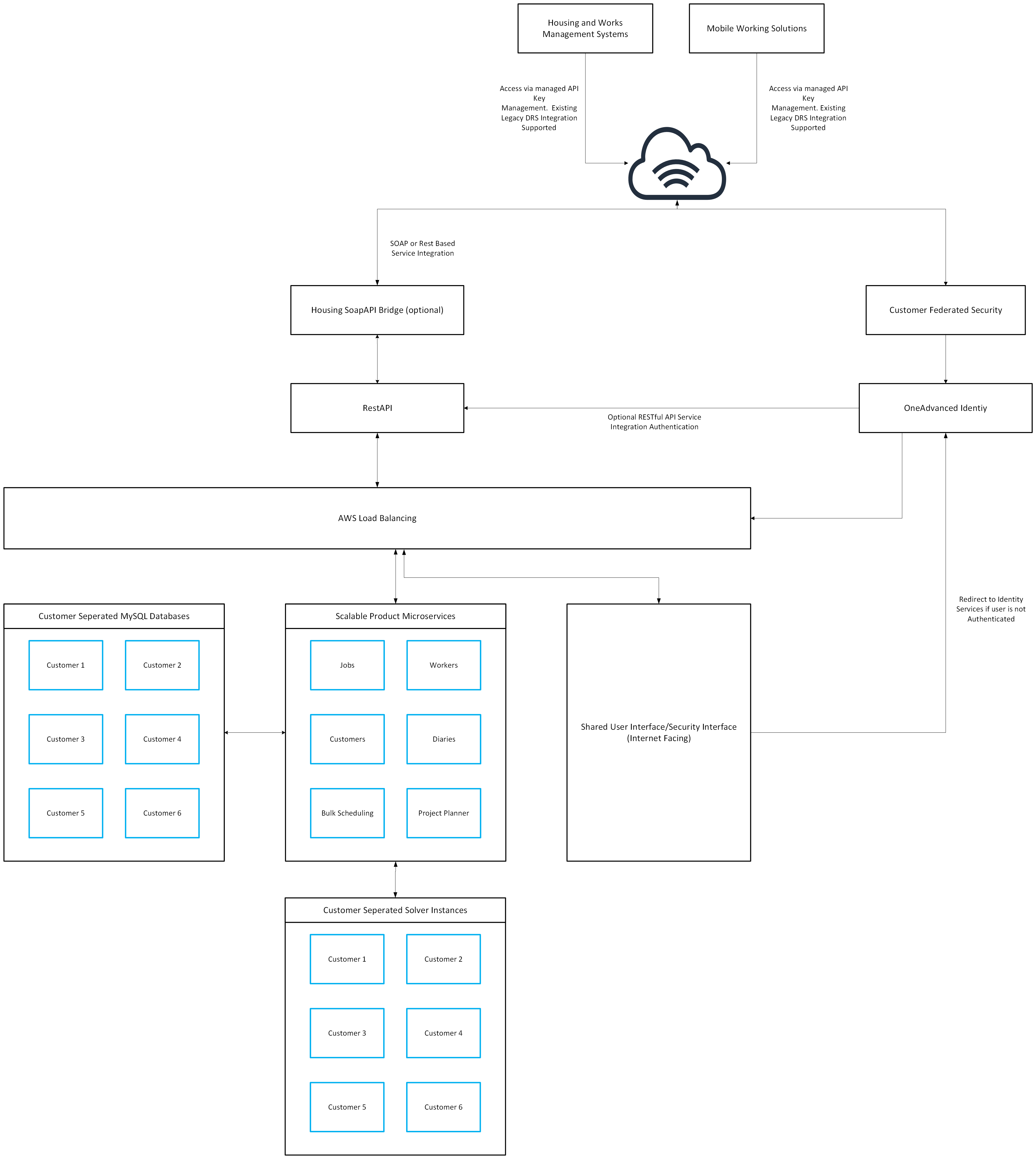
Dynamic Resource Scheduler is now designed around the latest Cloud Native architecture, embracing Identity Management and microservices to deliver significantly improved performance and reliable redundancy.
Integration and Connectivity
Dynamic Resource Scheduler is delivered as an internet-facing SaaS solution. Authentication for the application, customer environments and associated data is secured through the OneAdvanced Identity service, which is aligned with the OneAdvanced Trust Centre.
Integration with Dynamic Resource Scheduler is supported through two primary integration approaches.
Housing Integration Bridge
The Housing Integration Bridge acts as a compatibility layer that enables existing integrations to work with the new Dynamic Resource Scheduler service. It provides a straightforward path for organisations to maintain their current integrations while benefiting from the new platform.
The service is designed to provide backwards compatibility, with access secured through API tokens. New or replacement API keys can be generated through the Dynamic Resource Scheduler Administration Console, with access controlled by user profile permissions.
All existing integration services that use the DRS 5 and DRS 6 WebService Gateway are supported through the bridge, with no development changes expected. This remains the primary integration method for existing Housing and Works Management solutions.
Some configuration changes will be required to redirect existing integration endpoints, and in certain cases adjustments to network architecture may also be necessary.
In addition, some integration services currently using the Internal Core Gateway may be supported through the Housing Integration Bridge, subject to separate agreement.
Dynamic Resource Scheduler RESTful Service
The new Dynamic Resource Scheduler RESTful Service represents a major step forward in our integration capabilities, providing a direct connection to the platform’s native cloud environment. Through this API layer, organisations can integrate more deeply with the service, enabling greater control, automation and interaction with scheduling operations.
This RESTful service provides a more flexible and comprehensive approach to integration, allowing customers to exchange data more efficiently and automate a wider range of processes. It is designed to support more advanced use cases, giving organisations the ability to build richer integrations and take advantage of new platform features as they become available.
Using the RESTful Service will require new development by integrating systems. OneAdvanced provides supporting documentation to assist with implementation, and professional services are available to support design, consulting and delivery where required. Additional costs may apply for these services.